Tariff plans
The documentation provides a description with examples of the interface in Russian.
New users of 2GIS Pro are assigned a demo tariff plan upon registration by default. To expand operational features and access to 2GIS data, you can connect the Base tariff plan. If the Base tariff plan features are not enough, contact technical support to expand the tariff.
To check your current tariff plan, click  icon in the lower-left corner of the 2GIS Pro interface.
Base tariff plan
Analytics scenarios based on 2GIS data
When connecting the Base tariff plan, you automatically gain access to the Competitors and demand scenario, which allows you to find areas with high demand and low competition and identify optimal locations to open a business. This scenario includes access to the following datasets based on 2GIS data:
- Firms.
- Dynamics of organizations: dynamics of opening and closing firms.
- Demand: for viewing category demand.
Data from over 1000 subcategories of organizations from the 2GIS directory is available for analysis (for example, the Food service category contains the Pastry shops subcategory). Select up to 10 subcategories of your interest when connecting the tariff.
Additionally, you can choose one of the following scenarios for a deeper analysis of the urban environment:
-
City infrastructure: helps to analyze population density, transport accessibility, and building types in different city districts. If you choose this scenario when connecting the tariff, you will additionally get access to the following datasets:
-
Demographic portrait of the population: allows you to study the age-sex structure of the population and determine the concentration of the target audience in different parts of the city. If you choose this scenario when connecting the tariff, you will additionally get access to the following datasets:
- Territorial division: administrative territories.
- Population: information about the living and working population.
- Age-sex composition of the population: information about the distribution of the population by gender and age.
-
Transport accessibility: helps to analyze the transport and pedestrian accessibility of territories, which is particularly important for choosing locations for traffic-oriented businesses. If you choose this scenario when connecting the tariff, you will additionally get access to the following datasets:
For a detailed list of layers and widgets in the scenarios, see the Analytics scenarios overview.
Features
With the Base tariff, you can:
- Upload files with your own data in
.csv,.geojson, and other formats up to 20 MB. - Visualize data on the map in various ways.
- Create dashboards with scenes, layers, and widgets for data analysis.
- Export dashboards in
.pdfformat. - Build proximity zones: areas that can be reached on foot, by car, or by public transport within a certain time period. Total number of available calculations: 10 × number of subscription days.
- Aggregate data by polygons (arbitrary areas on the map). Aggregation is available for up to 1000 polygons or proximity zones.
- Use the Smart assistant: an AI-powered assistant for data analysis and hypothesis testing. 50 requests per day are available.
Price
The cost of the Base tariff depends on the selected territory (city) and the subscription period:
| City | 14 days | 30 days |
|---|---|---|
| Moscow, Saint Petersburg | 43,200 ₽ | 72,000 ₽ |
| Novosibirsk, Yekaterinburg, Nizhny Novgorod, Kazan, Chelyabinsk, Omsk, Samara, Rostov-on-Don, Ufa, Krasnoyarsk, Krasnodar, Perm, Voronezh, Volgograd, Tyumen, Sochi | 36,000 ₽ | 60,000 ₽ |
| Other cities of Russia | 30,000 ₽ | 50,000 ₽ |
Connecting the Base tariff
You can connect the Base tariff only if you have a demo tariff activated. If you want to pay for the tariff by invoice and receive accounting documents, please leave a request at dev.2gis.com.
To connect the Base tariff and pay for it with a bank card:
-
Click
icon in the lower-left corner of the 2GIS Pro interface. -
Click Change tariff.
-
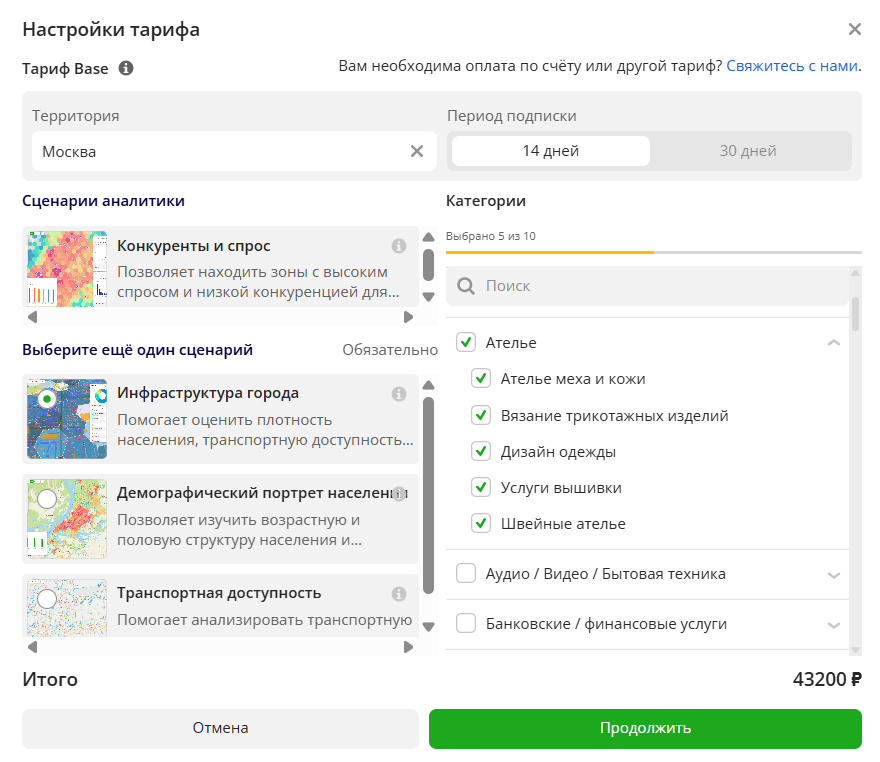
Specify the tariff settings:
-
Territory: the area for data analysis.
-
Analytics scenarios: one of the three additional scenarios.
-
Subscription period: 14 or 30 days.
-
Select categories: up to 10 data subcategories.
-
-
Click Continue.
-
Check the specified data and cost and click Pay.
-
Enter your card details and click Pay. Bank cards Mir, Visa, and MasterCard issued in the Russian Federation are accepted.
After payment, the tariff is activated automatically. A receipt and an email with information about the purchased tariff will be sent to the email address provided during registration.
Questions on tariffs
If you have any questions or want to expand available data, analytics scenarios, or territories, contact technical support in one of the following ways:
- Send a message to technical support: click
 Help icon in the lower-left corner, click
  Feedback icon, write a message, and click Submit.
 - Send an email to support.pro@2gis.ru.
- Leave a request at dev.2gis.com.