Style format specification
The style specification defines the appearance of the map: how, in which order, and in which form to draw the map data.
Specification versions
1.1.1
- Updated the type of the
iconPriorityproperty value in the "point" layer: nownumberorExpression<number>is accepted. - Updated the type of the
textPriorityproperty value in the "point" and "labelLine" layers: nownumberorExpression<number>is accepted.
1.1.0
- Added new layer types: "model", "polygonExtrusion", "lineExtrusion", "polygon3d", "metricPoint", "labelLine", and "group".
- Added new expressions: "literal" and "meters-to-pixels".
- Added the
patternproperty to the "line" layer and added pattern expressions. - Added the
visibilityproperty to the "heatmap" and "raster" layers. - Added the
lightstyle object property. - Added the
interactive,lightingMode,castShadows, andreceiveShadowslayer properties. - Added new value types:
DirectionalLight,AmbientLight, andShadows. - Fixed the description of color properties.
1.0.0
First public release of the specification.
Style object
There is no public API method provided for setting a style as an object. You can only set the ID of a style created in the Style editor. You can use the style object below to get a general understanding of its basic structure.
A style is an object in JSON format. The root of the object contains general information about the style and an array of map layers with their display settings.
{
  "version": 1,
  "name": "Night",
  "background": {
    "color": "#ffffff"
  },
  "labelingGroups": {...},
  "layers": [...]
}
version
number (required)
(Value must be 1.)
Major version number of the style format.
"version": 1
metadata
object (optional)
Custom data stored with the style object. Does not affect the appearance of the map.
background
object (required)
Background of the map.
Contains the following field:
color
color (required)
Background color.
light
object (optional)
Lighting settings of the map. Can contain two components: ambient light and directional light.
Example of the light object:
{
  "sources": {
      "sun": {
          "type": "directional",
          "color": "#FFFFFF",
          "azimuth": 230,
          "altitude": 50,
          "intensity": 0.12
      },
      "internal": {
          "type": "directional",
          "color": "#FFFFFF",
          "azimuth": 0,
          "altitude": 60,
          "intensity": 0.5
      },
      "atmosphere": {
          "type": "ambient",
          "color": "#FFFFFF",
          "intensity": 0.91
      },
      "sun_model": {
          "type": "directional",
          "azimuth": 270,
          "altitude": 50,
          "intensity": 0.4
      },
      "atmosphere_model": {
          "type": "ambient",
          "intensity": 0.7
      }
  },
  "lightingModes": {
      "none": [],
      "model": [
          "atmosphere_model",
          "sun_model"
      ],
      "global": [
          "sun",
          "atmosphere"
      ]
  },
  "defaultLightingMode": "global",
  "shadows": {
    "source": "sun",
    "radius": 1.5
  }
}
Contains the following fields:
sources
object (optional)
Available light sources. Can contain directional light sources DirectionalLight and ambient light sources AmbientLight.
Default value:
{
   "sun": {
      "type": "directional",
      "color": "#FFFFFF",
      "azimuth": 230,
      "altitude": 50,
      "intensity": 0.12
   },
   "internal": {
      "type": "directional",
      "color": "#FFFFFF",
      "azimuth": 0,
      "altitude": 60,
      "intensity": 0.5
   },
   "atmosphere": {
      "type": "ambient",
      "color": "#FFFFFF",
      "intensity": 0.91
   },
   "sun_model": {
      "type": "directional",
      "azimuth": 270,
      "altitude": 50,
      "intensity": 0.4
   },
   "atmosphere_model": {
      "type": "ambient",
      "intensity": 0.7
   }
}
lightingModes
object (optional)
(Value must be specified in the sources field of the light style object.)
Lighting modes available for layers. Determines which light sources are used in a mode. For example:
"none": []- no lighting"onlySun": ["sun"]- directional light source specified in thelight.sources.sunfield"onlyAmbient": ["atmosphere"]- ambient light source specified in thelight.sources.atmospherefield"global": ["sun", "backlight", "atmosphere"]- ambient light source specified in thelight.sources.atmospherefield and two directional light sources specified in thelight.sources.sunandlight.sources.backlightfields
One lighting mode can contain up to three light sources simultaneously, including only one ambient light source and no more than two directional light sources.
Default value:
{
   "global": ["sun", "atmosphere"],
   "model": [
      "atmosphere_model",
      "sun_model"
   ],
   "none": []
}
defaultLightingMode
string (optional)
(Value must be specified in the lightingModes field of the light style object. Default value is "global".)
Default lightingMode.
shadows
Shadows (optional)
Shadow settings for one directional light source. For more information, see the description of the Shadows value type. Currently supported only in MapGL JS API.
labelingGroups
object (optional)
Labeling groups and their settings.
Contains the following fields:
groups
array of string
(Default value is ["default"].)
Names of labeling groups.
overlay
array of array of string
Group overlay settings.
For example, if you specify [["group1", "group2"]], the group2 will overlay the group1 when they overlap. Overlapping all other groups will cause a z-index conflict. If the group is not specified in the groups array, it will be ignored.
layers
array of Layer (required)
Style layers that define the appearance of objects on the map.
Each layer type contains a unique set of properties. The following layer types are supported:
polygon- polygon with a color background and an outlineline- line with a widthdashedLine- dashed line with a width and dash propertiespoint- icon, a label, or an icon with a labelraster- bitmap imageheatmap- heatmapmodel- 3D model in glTF/GLB formatpolygonExtrusion- polygon with a color background and an outline, extended upwardslineExtrusion- line with a color background and an outline, extended upwardspolygon3d- polygon with elevation at verticesmetricPoint- flat image of physical dimensions in the map planelabelLine- text label along a linegroup- group for combining multiple layers
The display of layers on the map depends on their order specified in the array of the style. The layer that is lower in the layer list overlaps the content of the layer above it. Objects on the same layer are displayed according to their order in the data source.
Example:
"layers": [
  {
    "id": "water",
    "type": "polygon",
    "style": {
      "color": "#0000ff"
    }
  }
]
In the MapGL JS API, it is recommended to use only the layers and properties provided in this specification. There are additional types of layers available in the Style editor, but their specification may change later.
Layer
Each layer type contains the following fields:
- id
- type
- filter
- minzoom
- maxzoom
- interactive
- lightingMode
- castShadows
- receiveShadows
- style - depends on the layer type, see available layer types in the layers section
id
string (required)
Layer identifier. Must be unique for rendering to work correctly.
type
enum (polygon, line, dashedLine, point, raster, heatmap, model, polygonExtrusion, lineExtrusion, polygon3d, metricPoint, labelLine, group) (required)
Layer type.
filter
Expression<boolean> (required)
(Does not support the step and interpolate expressions.)
Filter that selects objects for the layer.
Example of a filter selecting all objects with the private or beach value of the layer attribute:
{
  "filter": ["match", ["get", "layer"], ["private", "beach"], true, false]
}
Example of a filter selecting all objects where three conditions are met:
"filter": [
  "all",
  ["match", ["get", "class"], ["road"], true, false],
  ["match", ["get", "type"], ["main"], true, false],
  ["match", ["global", "navigatorOn"], [true], true, false]
]
Example of a filter selecting all objects from the data source with the data_source_1 or data_source_2 value of the sourceAttr attribute:
{
  "filter": ["match", ["sourceAttr", "name"], ["data_source_1", "data_source_2"], true, false]
}
Example of a filter selecting all objects with the featureState_attr_value value of the custom object attribute:
{
  "filter": ["match", ["featureState", "name"], ["featureState_attr_value"], true, false]
}
minzoom
number (optional)
(0 to 20)
Minimum map zoom level for the layer. Layer objects are displayed only if the zoom level is greater than or equal to this value.
maxzoom
number (optional)
(0 to 20)
Maximum map zoom level for the layer. Layer objects are displayed only if the zoom level is less than this value.
interactive
boolean (optional)
(Default value is true. Ignored in layers with the group type.)
Whether information about displayed objects on this layer can be obtained.
The field is supported only in certain layers and layer objects.
lightingMode
string (optional)
(Value must be specified in the lightingModes field of the light style object. Default value is defined by the defaultLightingMode field.)
Lighting mode applied to the style layer.
castShadows
boolean (optional)
(Default value is true.)
Whether the layer casts shadows.
Only the layer with the lightingMode containing a DirectionalLight set in the shadows field of the light object can cast shadows.
receiveShadows
boolean (optional)
(Default value is true.)
Whether the layer receives shadows.
Only the layer with the lightingMode containing a DirectionalLight set in the shadows field of the light object can receive shadows.
style
object (optional)
Set of style properties for the layer. Depends on the layer type. See available layer types in the layers section.
style for "polygon"
color
color or Expression<color> (optional)
(Default value is "#000000".)
Fill color.
strokeColor
color or Expression<color> (optional)
(Default value is color.)
Stroke color.
strokeWidth
number or Expression<number> (optional)
(Default value is 1. Supports the interpolate and match expressions.)
Stroke width in pixels.
visibility
enum (visible, none) (optional)
(Default value is visible.)
Whether the layer objects are displayed on the map. visible - displayed, none - not displayed.
style for "line"
color
color or Expression<color> (optional)
(Default value is "#000000".)
Line color.
width
number or Expression<number> (optional)
(Default value is 1. Supports the interpolate and match expressions.)
Line width in pixels.
pattern
PatternExpression (optional)
Line with one of the following patterns:
doubledash- double dashed linetriangles- triangleschess- chess patternstripe- dashed line
visibility
enum (visible, none) (optional)
(Default value is visible.)
Whether the layer objects are displayed on the map. visible - displayed, none - not displayed.
style for "dashedLine"
color
color or Expression<color> (optional)
(Default value is "#000000".)
Color of line dashes.
width
number or Expression<number> (optional)
(Default value is 1. Supports the interpolate and match expressions.)
Line width in pixels.
dashLength
number or Expression<number> (optional)
(Default value is 1. Supports the interpolate and match expressions.)
Dash length in pixels.
gapLength
number or Expression<number> (optional)
(Default value is 1. Supports the interpolate and match expressions.)
Gap length in pixels.
gapColor
color or Expression<color> (optional)
(Default value is "rgba(0, 0, 0, 0)".)
Color of line gaps.
visibility
enum (visible, none) (optional)
(Default value is visible.)
Whether the layer objects are displayed on the map. visible - displayed, none - not displayed.
style for "point"
iconImage
string or Expression<string> (optional)
(Does not support the get, sourceAttr, featureState, and global extractor expressions.)
Icon name. If not specified, icon is not displayed.
It is recommended to use only square icons, because any icon is scaled to a square size (aspect ratio is 1).
iconWidth
number or Expression<number> (optional)
(From 0 to 512. Default value is 16. Does not support the get, sourceAttr, featureState, and global extractor expressions.)
Icon width in pixels.
iconAnchor
array of number (optional)
(Default value is ["literal", [0.5, 0.5]].)
Icon anchor position. Specified as an array of two relative coordinates X and Y.
For example:
["literal", [0, 0]]- upper-left corner of the icon["literal", [0.5, 0.5]]- center of the icon["literal", [1, 1]]- lower-right corner of the icon["literal", [-1, -1]]- anchor is outside the icon, the icon is displayed with an offset from its position on the map
iconOffset
array of number (optional)
(Default value is ["literal", [0, 0]].)
Offset of the iconAnchor point. Specified as an array of two numbers ["literal", [offsetX, offsetY]], where offsetX is the horizontal offset in pixels and offsetY is the vertical offset.
For example:
["literal", [10, 20]]- offset to the right by 10 pixels and down by 20["literal", [-15, -5]]- offset to the left by 15 pixels and up by 5["literal", [10, -5]]- offset to the right by 10 pixels and up by 5
textField
string or Expression<string> (optional)
(Default value is ["get", "db_label"].)
Label text.
textFont
string or Expression<string> (optional)
(Does not support the get, sourceAttr, featureState, and global extractor expressions.)
Label font. If not specified, label is not displayed.
textColor
color or Expression<color> (optional)
(Default value is "#000000".)
Label color.
textFontSize
number or Expression<number> (optional)
(From 0 to 512. Default value is 16. Does not support the get, sourceAttr, featureState, and global extractor expressions.)
Label font size in pixels.
textLineHeight
number (optional)
(Non-negative number. Default value is 1.2.)
Label line spacing in relative units (em).
textLetterSpacing
number (optional)
(Non-negative number. Default value is 0.)
Label letter spacing in relative units (em).
textPlacement
enum (topCenter, rightCenter, bottomCenter, leftCenter) or Expression<topCenter | rightCenter | bottomCenter | leftCenter> (optional)
(Default value is bottomCenter.)
Label location relative to the icon. If the icon is not specified, the parameter is not used.
topCenter- above the iconbottomCenter- under the iconleftCenter- left side of the iconrightCenter- right side of the icon
textOffset
number or Expression<number> (optional)
(Default value is 0.)
Label offset from the icon in pixels.
textHaloColor
color or Expression<color> (optional)
(Default value is "rgba(0, 0, 0, 0)".)
Label outline color.
textHaloWidth
number (optional)
(Default value is 0.)
Label outline width in pixels.
textMaxLengthPerLine
number (optional)
(Default value is 30.)
Line length for word wrapping (number of characters). If the value is greater, the next word is wrapped to the next line.
For example, if the value is 3, "Velikiy Novgorod" is split into two lines:
Velikiy
Novgorod
allowOverlap
boolean (optional)
(Default value is false.)
If true, the object is not a part of any labeling group and is always displayed. The iconLabelingGroup and textLabelingGroup properties are ignored.
iconLabelingGroup
string (optional)
(Value must be specified in the labelingGroups.groups array of the light style object. Default value is "default".)
Labeling group for the icon.
iconLabelingMargin
LabelingMargin (optional)
Extra icon margins in a labeling group.
iconPriority
number or Expression<number> (optional)
(Non-negative integer. Default value is 0.)
Icon priority in a labeling group. The higher the value, the higher the priority.
textLabelingGroup
string (optional)
(Value must be specified in the labelingGroups.groups array of the light style object. Default value is "default".)
Labeling group for the label.
textLabelingMargin
LabelingMargin (optional)
Extra label margins in a labeling group.
textPriority
number or Expression<number> (optional)
(Non-negative integer. Default value is 0.)
Label priority in a labeling group. The higher the value, the higher the priority. The value cannot exceed the iconPriority value. The label is hidden if its icon overlaps it.
visibility
enum (visible, none) (optional)
(Default value is visible.)
Whether the layer objects are displayed on the map. visible - displayed, none - not displayed.
style for "raster"
opacity
number or Expression<number> (optional)
(From 0 to 1. Default value is 1.)
Image opacity. 0 - image is fully transparent (invisible), 1 - image is fully filled.
visibility
enum (visible, none) (optional)
(Default value is visible.)
Whether the layer objects are displayed on the map. visible - displayed, none - not displayed.
style for "heatmap"
color
InterpolateExpression<color> (optional)
(From 0 to 1. Default value ["interpolate", ["linear"], ["heatmap-density"], 0, "rgba(53,136,253,0)", 0.2, "rgba(53,136,253,0.2)", 0.4, "rgb(255,201,77)", 0.6, "rgb(255,202,20)", 0.75, "rgb(245,0,7)", 1, "rgb(255,0,0)"].)
Color of each pixel depending on the intensity value.
radius
number or Expression<number> (optional)
(Non-negative integer. Default value is 30.)
Radius of heatmap points in pixels. The greater the value, the smoother the heatmap.
opacity
number or Expression<number> (optional)
(From 0 to 1. Default value is 1.)
Opacity of the entire heatmap layer. 0 - layer is fully transparent (invisible), 1 - layer is fully filled.
intensity
number or Expression<number> (optional)
(Non-negative number. Default value is 1.)
Heatmap kernel multiplier. The higher the value, the higher the color intensity. Applied to all heatmap points, unlike the weight parameter.
weight
number or Expression<number> (optional)
(Non-negative number. Default value is 1.)
How much a single point contributes to a heatmap. For example, 10 is equivalent to 10 points with a weight of 1 in the same location.
downscale
number (optional)
(Positive number. Default value is 1.)
Heatmap texture divider. The higher the value, the lower the heatmap quality, but the faster the speed of heatmap rendering.
visibility
enum (visible, none) (optional)
(Default value is visible.)
Whether the layer objects are displayed on the map. visible - displayed, none - not displayed.
style for "model"
For more information, see the Model requirements and recommendations section.
modelSrc
string or Expression<string> (optional)
(Supports the get and step expressions.)
URL to the model file.
color
color or Expression<color> (optional)
Color that blends with the model. By default, the color is blended with the model's texture using multiplication.
scale
number or Expression<number> or Expression<[number, number, number]> (optional)
(Default value is 1. Does not support the interpolate expression.)
Scale factor for the model. Can be a single number for uniform scaling or an array of three numbers for per-axis scaling: ["literal", [scaleX, scaleY, scaleZ]].
rotation
Expression<[number, number, number]> (optional)
(Default value is ["literal", [0, 0, 0]]. Does not support the interpolate expression.)
Rotation of the model around each axis in degrees: ["literal", [angleX, angleY, angleZ]].
offset
Expression<[number, number, number]> (optional)
(Default value is ["literal", [0, 0, 0]]. Does not support the interpolate expression.)
Offset for the model along each axis in meters: ["literal", [offsetX, offsetY, offsetZ]].
ignoreGlobalLighting
boolean (optional)
(Default value is false.)
If the value is true, the model ignores global lighting settings.
playAnimation
number, string, Expression<number> or Expression<string> (optional)
(Supports the match expression.)
Model animation.
If a number is passed, the animation contained in the model with the corresponding index is used. If a string is passed, the animation contained in the model with the corresponding name parameter is used.
The selected animation plays infinitely for all models in the layer while they are in the viewport. If the model does not have an animation with the specified index or name, the model is displayed without animation. If the model has multiple animations with the same name, they run simultaneously.
linkedIds
Expression<array of string> (optional)
(Does not support the interpolate expression.)
List of map object IDs to hide when displaying the model.
colorTextureUvIndex
number (optional)
(Default value is 0.)
Texture coordinates index for the color texture.
showRatio
number or Expression<number> (optional)
(From 0.0 to 1.0. Default value is 1. Supports the match, interpolate, and step expressions.)
Percentage of visible model instances. 0 - no instances are visible, 1 - all instances are visible, 0.5 - half of the instances are visible.
visibility
enum (visible, none) (optional)
(Default value is visible.)
Whether the layer objects are displayed on the map. visible - displayed, none - not displayed.
style for "polygonExtrusion"
topColor
color or Expression<color> (optional)
(Default value is "#000000".)
Fill color of the top face of the polygon extrusion.
sideColor
color or Expression<color> (optional)
(Default value is topColor.)
Fill color of the side faces of the polygon extrusion.
strokeColor
color or Expression<color> (optional)
(Default value is topColor.)
Stroke color.
strokeWidth
number or Expression<number> (optional)
(Non-negative integer. Default value is 1. Supports the interpolate and match expressions.)
Stroke width in pixels.
sideStrokeColor
color or Expression<color> (optional)
(Default value is sideColor.)
Side stroke color.
height
number or Expression<number> (optional)
(Non-negative integer. Supports the get expression.)
Height of the polygon extrusion in meters.
visibility
enum (visible, none) (optional)
(Default value is visible.)
Whether the layer objects are displayed on the map. visible - displayed, none - not displayed.
style for "lineExtrusion"
sideColor
color or Expression<color> (optional)
(Default value is "#000000".)
Fill color of the side faces of the line extrusion.
strokeColor
color or Expression<color> (optional)
(Default value is sideColor.)
Stroke color.
strokeWidth
number or Expression<number> (optional)
(Non-negative integer. Default value is 1. Supports the interpolate and match expressions.)
Stroke width in pixels.
sideStrokeColor
color or Expression<color> (optional)
(Default value is sideColor.)
Side stroke color.
height
number or Expression<number> (optional)
(Non-negative integer. Default value is 0. Supports the interpolate and match expressions.)
Height of the line extrusion in centimeters.
visibility
enum (visible, none) (optional)
(Default value is visible.)
Whether the layer objects are displayed on the map. visible - displayed, none - not displayed.
style for "polygon3d"
color
color or Expression<color> (optional)
(Default value is "#000000".)
Fill color.
textureImage
string or Expression<string> (optional)
(Supports the match and step expressions.)
Name of the texture from the icon collection. If the value is not specified, the texture is not displayed on the polygon, and the polygon is filled with the specified or default color.
textureSize
number or array of number (optional)
(Default value is 16.)
Size of the texture cell of which the overall texture pattern consists. If one number is specified, its value is applied to both width and height of the image, forming a square. To make a rectangle, specify an array of two elements, where the first element is width and the second is height.
In order to stretch the texture independently by width and height, some browsers (e.g., Firefox) require the none value of the preserveAspectRatio attribute in the SVG image.
textureOpacity
number or Expression<number> (optional)
(From 0 to 1. Default value is 1. Supports the interpolate, step, and match expressions.)
Texture opacity.
elevation
number or Expression<number> (optional)
(Non-negative integer. Supports the get expression.)
The elevation height of a polygon above ground level in meters.
visibility
enum (visible, none) (optional)
(Default value is visible.)
Whether the layer objects are displayed on the map. visible - displayed, none - not displayed.
style for "metricPoint"
Properties schema:
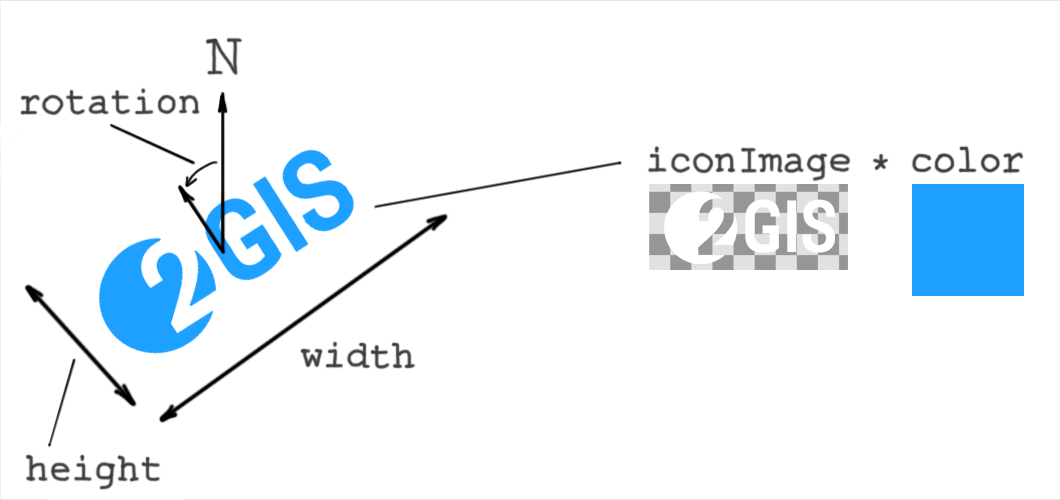
iconImage
string or Expression<string> (optional)
(Supports the match expression.)
Icon name. If not specified, the layer object is not displayed.
color
color or Expression<color> (optional)
(Default value is "#ffffff".)
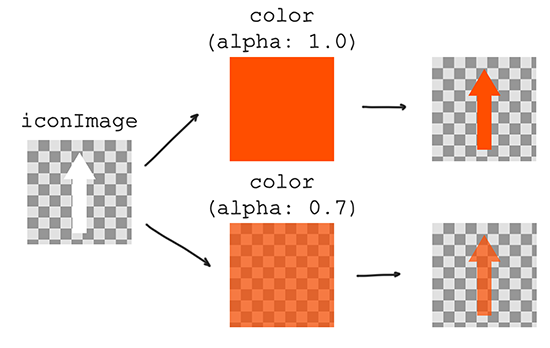
Color tinting of iconImage. Color components are multiplied by the image color of iconImage. For example, white color components will not affect the final color. If iconImage is not specified, the layer object is not displayed and the color value will not affect the result.
Examples of iconImage tinting using color:
rotation
number or Expression<number> (optional)
(Default value is 0. Supports the match expression.)
Rotation of the layer object relative to the zero direction (north). The rotation center is the center of the layer object rectangle. Rotation is counterclockwise in degrees.
width
number or Expression<number> (optional)
(Non-negative integer. Default value is 1. Supports the match expression.)
Width of the layer object in meters.
height
number or Expression<number> (optional)
(Non-negative integer. Default value is width. Supports the match expression.)
Height of the layer object in meters.
visibility
enum (visible, none) (optional)
(Default value is visible.)
Whether the layer objects are displayed on the map. visible - displayed, none - not displayed.
style for "labelLine"
textField
string or Expression<string> (optional)
(Default value is ["get", "db_label"]. Supports the get expression.)
Text content for the label.
textFont
string (optional)
(Default value is "Noto_Sans".)
Text font.
textColor
color or Expression<color> (optional)
(Default value is "#000000".)
Text color.
textFontSize
number or Expression<number> (optional)
(Non-negative integer. Default value is 16. Supports the interpolate and match expressions.)
Font size in pixels.
textLetterSpacing
number (optional)
(Non-negative number. Default value is 0.)
Letter spacing in relative units (em).
textHaloColor
color or Expression<color> (optional)
(Default value is "rgba(0, 0, 0, 0)".)
Text outline color.
textHaloWidth
number (optional)
(Non-negative integer. Default value is 0.)
Text outline width in pixels.
labelingGroup
string (optional)
(Default value is "default".)
Labeling group for the layer.
textPriority
number or Expression<number> (optional)
(Non-negative integer. Default value is 0.)
Label priority for labeling. The higher the value, the higher the priority.
textLabelingSideMargin
number (optional)
(Non-negative integer. Default value is 0.)
Additional side margins in pixels for the label during labeling.
textDuplicationSpacing
number or Expression<number> (optional)
(Non-negative integer. Default value is 0. Supports the interpolate and match expressions.)
Distance in pixels between label duplicates along the line.
lineEndingOffsets
number (optional)
(Non-negative integer. Default value is 0.)
Offset in pixels from line edges for label placement.
visibility
enum (visible, none) (optional)
(Default value is visible.)
Whether the layer objects are displayed on the map. visible - displayed, none - not displayed.
style for "group"
layers
array of Layer (required)
Array of layers that the group contains. The array must not contain other layers with the group type, because nested groups are not supported.
orderBy
array of get expressions (optional)
Defines the drawing order of objects on the map. Objects are grouped by the first expression. Within the resulting groups, they are regrouped by the next one, and so on.
Works only with numeric attributes. The lower the value, the earlier it is displayed. By default and if the orderBy expression is the same for different layers, the drawing order corresponds to the order of layers in the layers array.
Value types (T)
The following value types are available:
number
Regular JSON number in the range from -2147483 to 2147483.
May contain a fractional part, but all values are rounded to three decimal places.
Example:
{
  "textFontSize": 16
}
boolean
Regular JSON Boolean value: true or false.
Example:
{
  "allowOverlap": true
}
color
JSON string in one of the following formats:
{
    "color": "#ff0",
    "color": "#ffff00",
    "color": "#ffff00aa",
    "color": "rgb(255, 255, 0)",
    "color": "rgba(255, 255, 0, 1)",
    "color": "hsl(100, 50%, 50%)",
    "color": "hsla(100, 50%, 50%, 1)"
}
string
Regular JSON string.
Example:
{
  "name": "Snowy style"
}
enum
Set of possible string values.
For example, the visibility parameter can be only "visible" or "none":
{
  "visibility": "visible"
}
{
  "visibility": "none"
}
array
Regular JSON array.
Example of a numeric array:
[0, 0]
If an array is used in style properties or style expressions, it must be wrapped in the literal expression.
Example of an array used in the interpolate expression:
["interpolate",
  ["linear"],
  ["zoom"],
  10, ["literal", [0, 0]],
  15, ["literal", [5, 5]]
]
Example of an array used in style properties offset, scale, and rotation:
{
  "id": "sample-models",
  "filter": ["==", ["get", "db_sublayer"], "Sample_models"],
  "type": "model",
  "style": {
    "modelSrc": "model",
    "offset": ["literal", [0.5, 0, 0]],
    "scale": ["literal", [1, 1.2, 1]],
    "rotation": ["literal", [0, 90, 0]],
  }
}
If arrays are used in data (for example, in GeoJSON), the literal expression is not required:
{
    "type": "Feature",
    "properties": {
      "scale": [1, 1.2, 1],
    },
    "geometry": {
      "type": "Point",
      "coordinates": [35.547, 54.3213],
    },
}
object
Regular JSON object.
Example:
{
  "key1": "SomeValue",
  "key2": [0, 1],
  "key3": {
      "innerKey1": true,
  }
}
If an object is used in style properties or style expressions, it must be wrapped in the literal expression:
["match",
  ["get", "has_coords"],
  [true], ["literal", { "x": 1, "y": 2}],
  ["literal", { "x": -1, "y": -1 }]
]
Example of searching for the some_index attribute value as an object key in the in expression:
["match",
  ["in",
    ["get", "some_index"],
    ["literal",
      {
        "1": true,
        "2": true,
        "3": true
      }
    ]
  ]
]
LabelingMargin
Extra margins for objects. JSON object with two fields:
- topBottom
number(Default value is0.) - top and bottom margin in pixels - leftRight
number(Default value is0.) - left and right margin in pixels
Example:
{
  "topBottom": 10,
  "leftRight": 15,
}
DirectionalLight
object defining the configuration of a directional light source.
Used to create illumination of objects using directional light sources. Examples of directional light sources include the sun and the moon.
Contains the following fields:
type
string (required)
(Value must be "directional".)
Type.
altitude
number (required)
(From 0 to 90. Supports the match and interpolate expressions.)
Altitude of the light source in the horizontal coordinate system.
azimuth
number (required)
(From 0 to 360. Supports the match and interpolate expressions.)
Azimuth of the light source in the horizontal coordinate system.
color
color or Expression<color> (optional)
(Default value is "#ffffff". Supports the match and interpolate expressions.)
Color of the light source.
intensity
number (required)
(From 0 to 1. Supports the match and interpolate expressions.)
Intensity of the light source.
AmbientLight
object defining the configuration of an ambient light.
Used to create general non-directional illumination of objects.
Contains the following fields:
type
string (required)
(Value must be "ambient".)
Type.
color
color or Expression<color> (optional)
(Default value is "#ffffff". Supports the match and interpolate expressions.)
Color of the ambient light.
intensity
number (required)
(From 0 to 1. Supports the match and interpolate expressions.)
Intensity of the ambient light.
Shadows
object defining shadow settings.
Contains the following fields:
source
string (required)
(Value must be specified in the sources field of the light style object.)
Name of the light source casting shadows. Only DirectionalLight source type is supported.
radius
number (optional)
(From 0 to 3. Default value is 1.5.)
Shadow blur radius. The higher the value, the softer the shadow edges.
Expressions (Expression<T>)
An expression is a special JSON array that can be used instead of a plain value in properties. Expressions can be represented as functions that return a value of a specific type (<T>). For example, an expression that can be used instead of a number value is denoted as Expression<number>.
The first element of the expression is its name, all subsequent elements are its arguments. Expressions can be nested (one expression can be used as an argument for another).
Example:
{
  "filter": ["match", ["get", "type"], ["area"], true, false],
}
The match expression compares two values and returns a Boolean (or other) result. Here, expression arguments are:
["get", "type"]- first value to compare (thegetexpression is used to get the value)["area"]- second value to comparetrue- returns if the values are equalfalse- returns if the values are not equal
Different types of expressions are available:
Type expressions
to-boolean
Converts the value to a Boolean. Returns false for empty strings, false, 0, null, and NaN. Otherwise, returns true.
Schema:
["to-boolean", ExpressionOrValue]: boolean
to-color
Converts the string color to the inner color type.
In case of a conversion error, the default color is rgba(0, 0, 0, 0).
Formats:
"#ff0",
"#ffff00", // RGB
"#ffff00aa", // RGBA
"rgb(255, 255, 0)",
"rgba(255, 255, 0, 1)",
"hsl(100, 50%, 50%)",
"hsla(100, 50%, 50%, 1)"
Schema:
["to-color", ExpressionOrValue]: InnerColorType
Example:
["to-color", ["get", "color-from-source"]]
literal expression
If a JSON array or object is used as an argument for a style property or expression, it must be wrapped in the literal expression.
Examples:
"someOffset": [
  "interpolate", ["linear"], ["zoom"],
  10, ["literal", [0, 0]],
  15, ["literal", [5, 5]]
]
{
  "iconAnchor": ["literal", [0.5, 0.5]]
}
The literal expression is created to ensure backward compatibility when new expressions are added to the specification. For example, the first element of an array is not an expression name: ["step", ["zoom"], ["foo", "bar"], 15, ["foo", "baz"]]. If such constructs were allowed, adding a new foo expression would cause an error.
meters-to-pixels expression
Converts a value from meters to pixels. Can be used to specify object parameters on the map in real-world units, so that they scale consistently at different zoom levels.
Schema:
["meters-to-pixels", valueInMeters: ExpressionOrValue]: number
If you pass another expression to the valueInMeters that does not resolve to the number, the result is undefined.
When the meters-to-pixels expression is used for the textureSize property, the valueInMeters must be a number.
Example:
"textureSize": ["meters-to-pixels", 10],
To convert an array of numbers (for example, non-square texture size), use the literal expression:
Example:
"textureSize": ["literal", [["meters-to-pixels", 10], ["meters-to-pixels", 15]]],
Extractor expressions
Extractor expressions can be used to get the value from object attributes, data sources, or global style variables.
get
Extracts the value of one of the object attributes. Returns null if the requested property is missing.
Schema:
["get", string]: value
Example:
["get", "objectAttrName"];
sourceAttr
Extracts the value of the data source of the object. Returns null if the requested property is missing.
Schema:
["sourceAttr", string]: value
Example:
["sourceAttr", "sourceAttrName"];
featureState
Extracts the value of a custom object attribute. Returns null if the requested property is missing.
Works only with the defaultSource objects.
Schema:
["featureState", string]: value
Example:
["featureState", "featureStateAttrName"];
global
Extracts the value of a global style variable. Returns null if the requested variable is missing.
The following reserved global variables are set by the map:
_activeFloorBuildingIds- array of building IDs with active floor plans. ID is a 64-bit integer from data converted to a string. Returnsnullif there are no active floors._activeFloorIds- array of active floor IDs from buildings with active floor plans. ID is a 64-bit integer from data converted to a string. Returnsnullif there are no active floors._activeFloorIsMetro- Boolean variable.trueif active floor plan is a metro schema.trafficOn- Boolean variable.trueif traffic display is enabled.parkingOn- Boolean variable.trueif parking lots display is enabled.navigatorOn- Boolean variable.trueif navigation mode is enabled.immersiveRoadsOn- Boolean variable.trueif immersive roads rendering is enabled.terrainEnabled- Boolean variable.trueif 3D terrain is enabled.
You can specify global variables via the API. It is recommended not start variable names with _, as this prefix may become reserved in the future. For reserved Boolean global variables, the default value is false.
Schema:
["global", string]: value
Example:
["global", "globalVariableName"];
Logical expressions
Logical expressions compare multiple values to determine a single output.
!
Returns true if the value is false, and vice versa. If the value is not Boolean, converts it to a Boolean using the to-boolean expression.
Schema:
["!", ExpressionOrValue]: boolean
==
Returns true if the two values are equal. Otherwise, returns false.
Schema:
["==", InputType, InputType]: boolean
Where InputType are the values for comparison.
!=
Returns false if the two values are equal. Otherwise, returns true.
Schema:
["!=", InputType, InputType]: boolean
Where InputType are the values for comparison.
> >= < <=
Compares two values by the corresponding relationship.
Schema:
[">", InputType, InputType]: boolean
[">=", InputType, InputType]: boolean
["<", InputType, InputType]: boolean
["<=", InputType, InputType]: boolean
Where InputType are the values for comparison.
match
Compares one value with a set of values. Returns one result if the first value matches at least one value in the set. Otherwise, returns another result.
Can be used to compare one value with several sets of values.
Schema:
["match",
  actual: Expression<InputType>,
  expected_1: InputType[], output_1: OutputType,
  expected_2: InputType[], output_2: OutputType,
  //...,
  fallback: OutputType
]: OutputType
Where:
actual- expression to get the value for comparisonexpected_n- array of values for comparisonoutput_n- result to return if theactualvalue matches one of theexpected_nvaluesfallback- result to return if theactualvalue does not match any value from theexpected_narraysInputType- type of the value, must bestring,number, orbooleanOutputType- type of the result value
Example of a single array:
{
  "filter": [
    "match",
    // Obtains the layer attribute of the object
    ["get", "layer"],
    // Returns true if the layer attribute matches one of the array values
    ["private", "beach"], true,
    // Returns false otherwise
    false
  ]
}
Example of multiple arrays:
{
  "color": [
    "match",
    // Obtains the type attribute of the object
    ["get", "type"],
    // Returns black color if the type is "building"
    ["building"], "#000000",
    // Returns green color if the type is "area"
    ["area"], "#00FF00",
    // Returns white color in other cases
    "#FFFFFF"
  ]
}
Example of using an extractor expression to get the value for comparison:
{
  "color": [
    "match",
    // Obtains the value of the global variable "trafficOn"
    ["global", "trafficOn"],
    // Returns red color if the value of "trafficOn" is true
    [true], "rgb(255, 0, 0)",
    // Returns white color otherwise
    "#ffffff"
  ]
}
all
Compares multiple Boolean values. Returns true if all values are true. If at least one value is false, returns false.
Schema:
["all", BooleanExpression, BooleanExpression, ...]: boolean
Where BooleanExpression are the expressions that return a Boolean value.
For example, the following expression returns true only if the object is a paid highway:
"filter": [
  "all",
  // Object type in the data source must be "roads"
  ["match", ["sourceAttr", "type"], ["roads"], true, false],
  // Object category must be "highway"
  ["match", ["get", "category"], ["highway"], true, false],
  // "isPaid" object attribute must be true
  ["get", "isPaid"],
]
any
Compares multiple Boolean values. Returns true if at least one value is true.
Schema:
["any", BooleanExpression, BooleanExpression, ...]: boolean
Where BooleanExpression are the expressions that return a Boolean value.
Example of an expression returning true if the object is a highway or an internal road:
"filter": [
  "any",
  // Checks for a highway
  ["match", ["get", "category"], ["highway"], true, false],
  // Checks for an internal road
  ["match", ["get", "category"], ["internal"], true, false],
]
in
Checks whether an array includes a certain value. The first argument is the value, the second is the array. Works only with an array of number or string. If the second argument is equal to null, returns false.
Schema:
["in",
  item: ItemType,
  array: ArrayType,
]: boolean
Where:
ItemType- number, string, Boolean, or extractor expressionArrayType- expression that returns data as an array
Example:
// If a global variable "foo" is an array ["a", "b", "c"], then:

["in", "a", ["global", "foo"]] // Returns true

["in", "d", ["global", "foo"]] // Returns false

["in", ["get", "bar"], ["global", "foo"]] // Returns true, if the object attribute "bar" is either "a", "b", or "c"
Mathematical expressions
Expressions performing different mathematical operations.
^
Returns the value of the first parameter raised to the power specified by the second parameter.
Schema:
["^", ExpressionOrValue, ExpressionOrValue]: number
log10
Returns the base 10 logarithm of the first parameter.
Schema:
["log10", ExpressionOrValue]: number
Interpolation expressions
Interpolation expressions return a value A depending on another value B. Currently, only the zoom level of the map can be used as B.
interpolate
Returns a value interpolated between a start value and end value. For example, if the start value is 20 on zoom level 10 and the end value is 30 on zoom level 15, then 24 is an interpolated value on zoom level 12. The expression does not return a value lower than the start value or higher than the end value.
You can specify multiple points for interpolation and change the interpolation formula from linear to exponential. Values must be specified in ascending order.
You can also use the interpolate expression for colors.
Schema:
["interpolate",
  interpolation: ["linear"] | ["exponential", base],
  ["zoom"],
  zoom_1: number, output_1: OutputType,
  zoom_2: number, output_2: OutputType,
  //...
]: OutputType
Where:
interpolation- interpolation formula. For"exponential", you can specify thebaseparameter (from0to2, default value is1).zoom_n- map zoom level.output_n- value corresponding tozoom_n.OutputType- value type. Can benumberorcolor.
Example of changing the width depending on the current zoom level of the map:
{
  "width": [
    "interpolate", ["linear"], ["zoom"],
    // If the zoom level is ≤ 10, returns 5
    10, 5,
    // If the zoom level is between 10 and 15, returns an interpolated value from 5 to 8
    15, 8,
    // If the zoom level is ≥ 15, returns 8
  ]
}
Examples of interpolating colors:
{
  "textColor": [
    "interpolate", ["exponential"], ["zoom"],
    // Gradually changes the color from red at zoom level 14 and below...
    14, "#ff0000",
    // ...to black at zoom level 17...
    17, "#000",
    // ...to semi-transparent cyan at zoom level 19 and above
    19, "rgba(0, 100, 200, 50%)"
  ]
}
step
Returns different values depending on whether the current value is greater than the specified values. For example, you can specify a value to be returned when the current map zoom level is less than 10, and another value when it is greater than 10.
Values must be specified in ascending order.
You can also use the step expression for colors.
Schema:
["step",
  ["zoom"],
  defaultValue : OutputType,
  zoom_1: number, output_1: OutputType,
  zoom_2: number, output_2: OutputType,
  //...
]: OutputType
Where:
defaultValue- value to be returned if the current map zoom level is less than the first specified value.zoom_n- map zoom level.output_n- value corresponding tozoom_n.OutputType- value type. Can be any of the basic types.
Example of changing the font size of a label depending on the current zoom level of the map:
{
  "fontSize": [
    "step", ["zoom"],
    // If the zoom level is < 10, returns 12
    12,
    // If the zoom level is between 10 and 15, returns 16
    10, 16,
    // If the zoom level is ≥ 15, returns 22
    15, 22,
  ]
}
Example of changing the label font:
{
  "textFont": [
    "step", ["zoom"],
    // Uses Noto Sans when the zoom level is < 15
    "Noto_Sans",
    // Uses Noto Sans Bold when the zoom level is ≥ 15
    15, "Noto_Sans_Bold",
  ]
}
Pattern expressions
Pattern expressions define patterns on lines.
Schema:
[
  "pattern",
  type,       // Pattern type
  ...params   // Pattern parameters
]
Pattern parameters are specified in pixels or in meters using the meters-to-pixels expression.
Pattern parameters support the interpolate and match expressions.
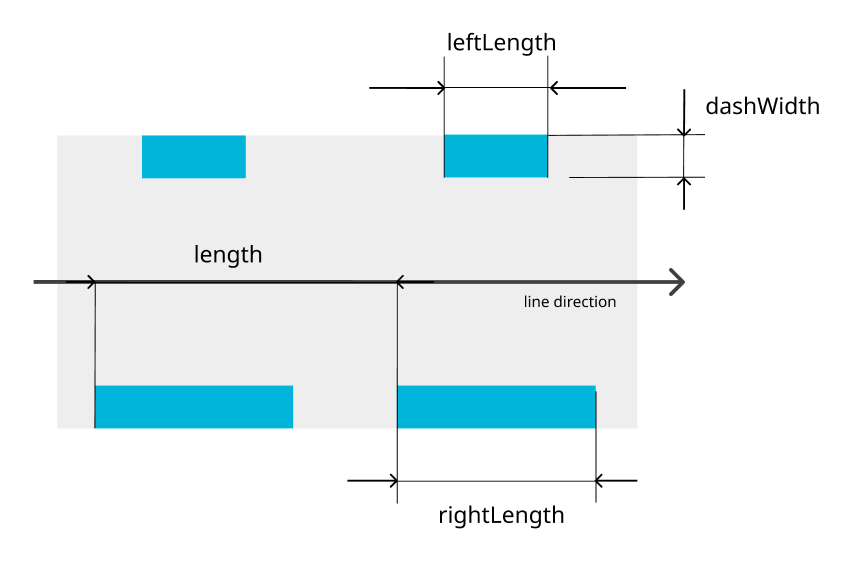
doubledash pattern
Double dashed line.
[
  "pattern",
  "doubledash", // Pattern type
  length,       // Total pattern length
  dashWidth,    // Width of dashes inside the line
  leftLength,   // Length of left dash
  rightLength,  // Length of right dash
]
| Parameter | Purpose | Required | Recommended value | Range |
|---|---|---|---|---|
length | Total pattern length | Yes | 8 | 0–1000 |
dashWidth | Width of dashes inside line | Yes | 2 | 0–width (within the line width bounds) |
leftLength | Length of left dash | Yes | 4 | 0–1000 |
rightLength | Length of right dash | Yes | 4 | 0–1000 |
triangles pattern
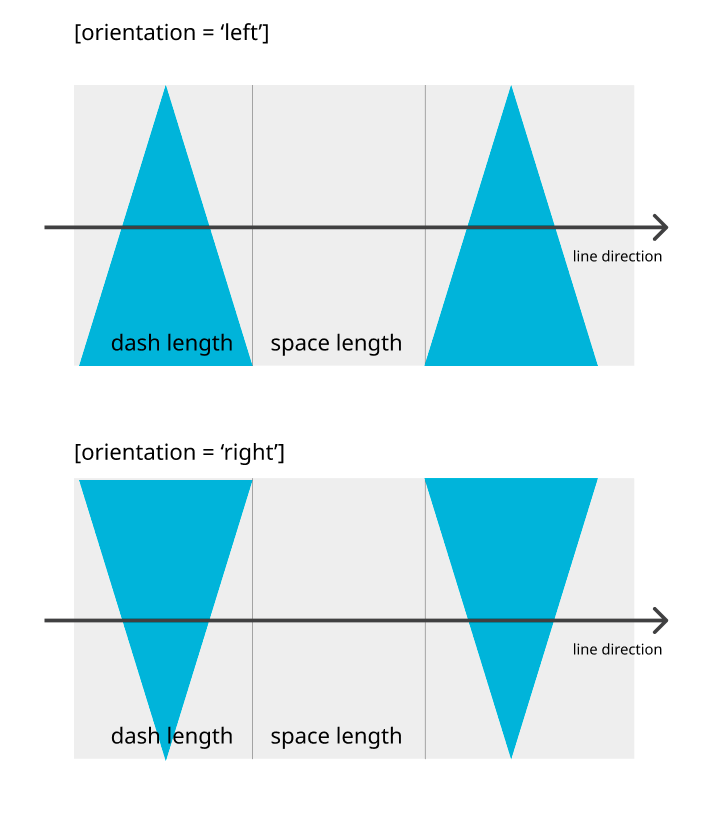
Isosceles triangles.
[
  "pattern",
  "triangles",  // Pattern type
  dashLength,   // Triangle base length
  spaceLength,  // Gap length
  orientation   // Triangle orientation on the line
                // (Sharp end pointing left or right)
]
| Parameter | Purpose | Required | Recommended value | Range |
|---|---|---|---|---|
dashLength | Triangle base length | Yes | 4 | 0–100 |
spaceLength | Gap length | Yes | 4 | 0–100 |
orientation | Triangle orientation on the line | Yes | "left" | ["left", "right"] |
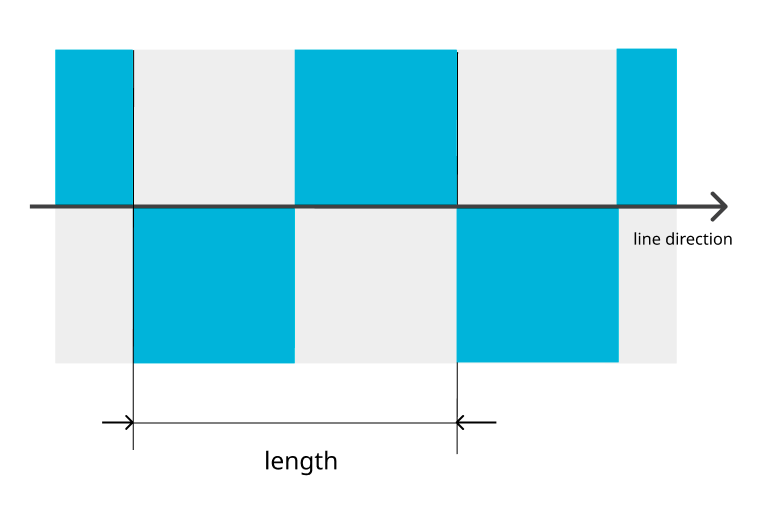
chess pattern
Chess pattern.
[
  "pattern",
  "chess",      // Pattern type
  length,       // Total pattern length
]
| Parameter | Purpose | Required | Recommended value | Range |
|---|---|---|---|---|
length | Total pattern length | Yes | 8 | 0–1000 |
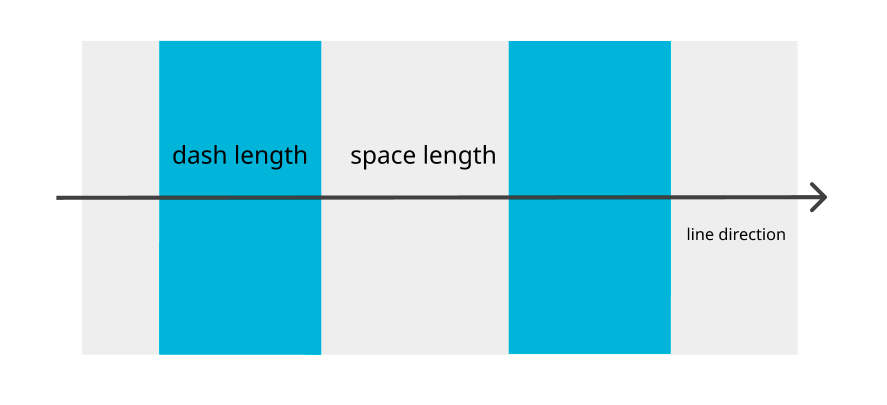
stripe pattern
Dashed line.
[
  "pattern",
  "stripe",      // Pattern type
  dashLength,    // Dash length
  spaceLength,   // Gap length
]
| Parameter | Purpose | Required | Recommended value | Range |
|---|---|---|---|---|
dashLength | Dash length | Yes | 4 | 0–1000 |
spaceLength | Gap length | Yes | 4 | 0–1000 |
Expression<color> cases
Color properties support different expression types. Some expressions return color values directly and others require the to-color wrapper.
Direct color expressions
Does not require the to-color wrapper.
match:["match", ["global", "test"], [true], "#00FF00", "#FF0000"]interpolate:["interpolate", ["exponential"], ["zoom"], 12, "#ffffff", 15, "#0000ff"]step:["step", ["zoom"], "#444444", 13, "#44FF44", 14, "#FF4444"]
Extractor expressions
Requires the to-color wrapper.
get:["to-color", ["get", "color"]]sourceAttr:["to-color", ["sourceAttr", "color"]]global:["to-color", ["global", "color"]]featureState:["to-color", ["featureState", "color"]]