Examples
Examples below explain and illustrate how to use parameters from the API Reference when sending requests to TSP API.
Point parameters
For each point, you can:
- specify the point type
- configure time windows during which the point can be visited
- specify the service time the courier will spend at the point
- configure parameters related to order pickup at depot
- link a delivery point
- set a penalty for not visiting a point
Point types
Each point in the waypoints array can have one of the following types (type):
delivery(default) - delivery point. The courier delivers cargo to this point.pickup- pickup point. The courier picks up cargo from this point.agent- current location of the courier. Used to set the courier's starting position as a regular point (instead of specifyingstart_atin the courier parameters).
For example, to set a pickup point:
{
    "waypoints": [
        {
            "id": "wp-pickup-1",
            "point": {
                "lat": 54.994814,
                "lon": 82.87837
            },
            "type": "pickup",
            "shipment_size": {
                "weight_kg": 10
            }
        }
    ]
}
Time windows for visiting a point
Time windows are allowed time intervals for visiting a point. Available types of time windows:
- Hard (
hard_time_window): if the courier does not reach the point within the specified time interval, the point is excluded from the route calculation. - Soft with hard limits (
time_window+hard_time_window): the courier can be late relative to the soft window but cannot exceed the hard window boundaries. A soft time window means that the point remains in the route calculation even if the courier is late.
You can set a time window in one of the formats (UTC or with an offset in accordance with ISO 8601):
hh:mm-hh:mm(e.g.,08:00-10:00)hh:mm:ss-hh:mm:ss(e.g.,08:00:30-10:00:30)- ISO 8601 (e.g.,
2025-09-16T16:00:00+03:00/2025-09-16T19:00:00+03:00)
For example, to set a hard time window for a point and visit it from 3:07 PM to 5:54 PM:
{
    "waypoints": [
        {
            "id": "wp-0",
            "point": {
                "lat": 54.994814,
                "lon": 82.87837
            },
            "time_windows": [
                {
                    "hard_time_window": "15:07-17:54"
                }
            ]
        }
    ]
}
For example, to set a soft time window with hard limits (the courier can be late, but no more than 30 minutes):
{
    "waypoints": [
        {
            "id": "wp-0",
            "point": {
                "lat": 54.994814,
                "lon": 82.87837
            },
            "time_windows": [
                {
                    "time_window": "15:07-17:54",
                    "hard_time_window": "14:37-18:24"
                }
            ]
        }
    ]
}
Service time at a point
You can specify the time that the courier will spend at the point (for example, to register and pick up cargo) using the service_duration_s parameter. Time is specified in seconds.
For example, to stay at a point for 10 minutes:
{
    "waypoints": [
        {
            "id": "wp-0",
            "point": {
                "lat": 54.994814,
                "lon": 82.87837
            },
            "service_duration_s": 600
        }
    ]
}
Order pickup at depot
For delivery points (type: "delivery"), you can specify parameters related to order pickup at the depot:
depot_ready_time- time when the order will be ready for pickup at the depot. The courier cannot pick up the order before this time.depot_expiring_time- deadline by which the courier must pick up the order at the depot.depot_duration_s- time period (in seconds) required for loading or unloading at the depot. During route calculation, it is considered separately from theservice_duration_sof the point.
You can set a time in one of the formats (UTC or with an offset in accordance with ISO 8601):
hh:mm(e.g.,08:00)hh:mm:ss(e.g.,08:00:00)- ISO 8601 (e.g.,
2025-09-16T16:00:00+03:00)
For example, the order will be ready at the depot by 10:00 AM, must be picked up before 12:00 PM, and loading takes 5 minutes:
{
    "depots": [
        {
            "id": "depot-0",
            "point": { "lat": 55.751244, "lon": 37.618423 },
            "time_windows": { "hard_time_window": "08:00-20:00" }
        }
    ],
    "waypoints": [
        {
            "id": "wp-0",
            "point": { "lat": 54.994814, "lon": 82.87837 },
            "type": "delivery",
            "depot_ids": ["depot-0"],
            "depot_ready_time": "10:00",
            "depot_expiring_time": "12:00",
            "depot_duration_s": 300,
            "service_duration_s": 600
        }
    ]
}
In this example:
- the courier can pick up the order at the
depot-0depot no earlier than 10:00 AM and no later than 12:00 PM - loading at the depot takes 5 minutes (300 seconds)
- delivering the order at the
wp-0point takes 10 minutes (600 seconds)
Linked delivery point
The delivery_to parameter links a pickup point (type: "pickup") to a specific delivery point. This ensures that cargo picked up at the pickup point will be delivered to the specified point, and both points will be visited by the same courier.
For example, to pick up cargo from the wp-pickup point and deliver it to the wp-delivery point:
{
    "waypoints": [
        {
            "id": "wp-pickup",
            "point": { "lat": 55.751244, "lon": 37.618423 },
            "type": "pickup",
            "delivery_to": "wp-delivery",
            "shipment_size": {
                "weight_kg": 25
            }
        },
        {
            "id": "wp-delivery",
            "point": { "lat": 55.773128, "lon": 37.597472 },
            "type": "delivery",
            "shipment_size": {
                "weight_kg": 25
            }
        }
    ],
    "agents": [
        {
            "id": "agent-0",
            "capacity": {
                "weight_kg": 100
            },
            "cost": {}
        }
    ]
}
In this example, the algorithm guarantees that:
- the
wp-pickuppoint will be visited beforewp-delivery - both points will be assigned to the same courier's route
- if one of the linked points is excluded from the task, the other point will also be excluded
- the 25 kg weight will be accounted for when calculating the courier's load: it will appear after pickup and disappear after delivery
Penalty for not visiting a point
You can set a penalty for not visiting a point using the penalties.drop parameter. For example:
{
    "waypoints": [
        {
            "id": "wp-important",
            "point": { "lat": 54.994814, "lon": 82.87837 },
            "time_windows": [{ "hard_time_window": "10:00-12:00" }],
            "penalties": {
                "drop": 6000
            }
        },
    ]
}
The algorithm compares the penalty amount and the courier operating cost during optimization. If the penalty for not visiting a point is higher than the cost of adding another courier, the algorithm will prefer to involve an additional courier. If lower, it will exclude the point from the route. To ensure the algorithm correctly compares the penalty and the courier operating cost, specify these values in the same units.
Depot parameters
Depots are specified in a separate depots array at the top level of the request. Unlike regular points (waypoints), depots do not participate in optimizing the sequence of visits. They serve as starting and ending points for couriers.
Depots:
- can have their own operating schedule (
time_window) - have a service time (
service_duration_s) that is accounted for in the route calculation - support penalties for early or late service (
penalties)
For example, to set up a depot with an operating schedule and loading time:
{
    "depots": [
        {
            "id": "depot-0",
            "point": {
                "lat": 55.751244,
                "lon": 37.618423
            },
            "service_duration_s": 900,
            "time_window":
                {
                    "hard_time_window": "08:00-20:00"
                }
        }
    ],
    "agents": [
        {
            "id": "agent-0",
            "start_at": "depot-0",
            "finish_at": "depot-0",
            "cost": {}
        }
    ],
    "waypoints": [...]
}
If a delivery point can be served from multiple depots, specify their identifiers in the depot_ids parameter of the point. The algorithm will select the optimal depot:
{
    "depots": [
        {
            "id": "depot-north",
            "point": { "lat": 55.85, "lon": 37.60 },
            "time_window": { "hard_time_window": "08:00-18:00" }
        },
        {
            "id": "depot-south",
            "point": { "lat": 55.65, "lon": 37.62 },
            "time_window": { "hard_time_window": "08:00-18:00" }
        }
    ],
    "waypoints": [
        {
            "id": "wp-0",
            "point": { "lat": 55.75, "lon": 37.61 },
            "type": "delivery",
            "depot_ids": ["depot-north", "depot-south"]
        }
    ]
}
Route parameters
You can specify additional routing parameters:
- Specify the route type: shortest in time (considering traffic jams for cars and trucks), or shortest in distance.
- Specify the transportation type: by car (default), by truck, by bicycle, by scooter, or on foot.
- Get information about route duration in the response.
- Pass initial routes.
Shortest route in time
By default, the shortest car route in time using current traffic data is built. To specify the route type explicitly, add the route_type parameter to the request:
{
    "waypoints": [...],
    "agents": [...],
    "options": {
        "route_type": "jam" // car route using current traffic data
    }
}
Instead of current traffic data, you can build a route using statistical traffic data. To do this, specify the statistics route type and the required date as the date parameter:
{
    "waypoints": [...],
    "agents": [...],
    "options": {
        "route_type": "statistics", // car route using statistical traffic data...
        "date": "2020-05-15", // ...as of 15 May 2020
        "time_zone": "UTC"
    }
}
If the date parameter is not specified, the current date is used.
The jam and statistics values take into account traffic jams only for cars (driving) and trucks (truck). For bicycles (bicycle) and scooters (scooter), these values return the shortest route in time without considering traffic jams.
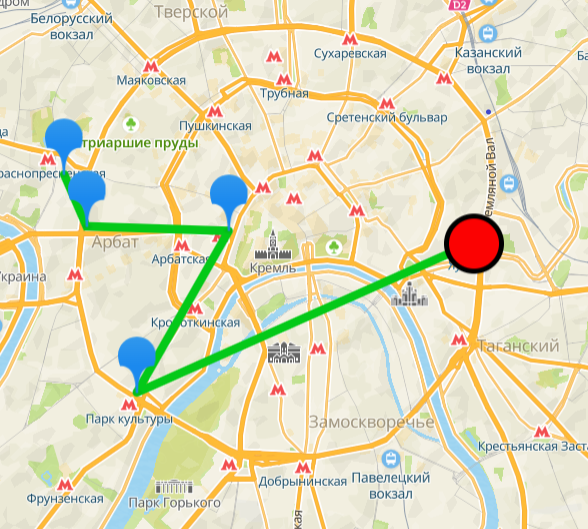
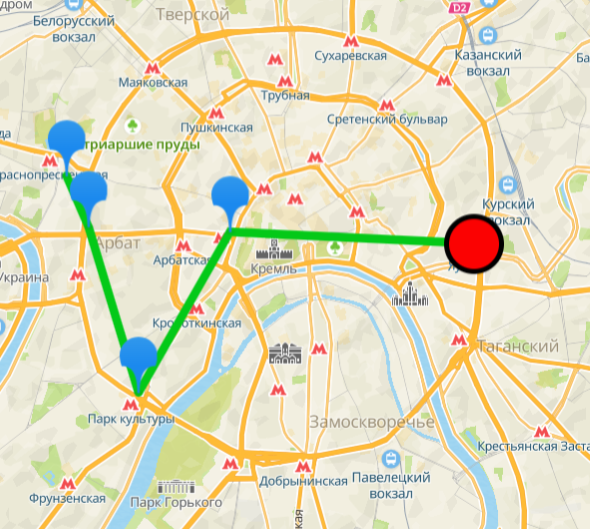
Example of calculating the order of visiting points considering the current traffic data (on the left) and the statistical traffic data (on the right):
Shortest route in distance
To build the shortest route in distance, even if it is not the fastest one due to traffic jams, specify the shortest route type:
{
    "waypoints": [...],
    "agents": [...],
    "options": {
        "route_type": "shortest"
    }
}
This route type is available for all types of transport. For pedestrians (walking), the shortest route is the only possible one: the values of route_type do not affect the result.
Car route
By default, a car route is built. To explicitly specify this transport type, set the routing_type parameter to driving:
{
    "waypoints": [...],
    "agents": [...],
    "options": {
      "routing_type": "driving" // car route
    }
}
Truck route
To build a truck route:
-
Specify the
routing_typeparameter with the valuetruck:{"waypoints": [...],"options": {"routing_type": "truck" // cargo transport}} -
(Additional) Specify the cargo and transport features using the
truck_paramsparameter. If a feature is not specified, its default value is used:{"waypoints": [...],"options": {"routing_type": "truck","truck_params": {"max_perm_mass": 10,"mass": 9,"axle_load": 4,"height": 3.2,"width": 2.5,"length": 7,"dangerous_cargo": true,"explosive_cargo": true}}} -
If the route goes through pass zones where the movement of trucks is limited:
-
Get a list of all active passes for trucks: send a GET request to /truck_passes/1.0.0/global
curl --location --request GET 'http://routing.api.2gis.com/truck_passes/1.0.0/global?key=API_KEY' \--header 'Accept: application/json'All current pass zones and pass IDs are listed in the response.
-
Specify the required pass IDs using the
pass_zone_pass_idsparameter when sending a request to TSP API:{"waypoints": [...],"options": {"routing_type": "truck","pass_zone_pass_ids": [4, 3, 2]}}
-
Bicycle route
To build a bicycle route, specify the routing_type parameter with the value bicycle:
{
    "waypoints": [...],
    "agents": [...],
    "options": {
        "routing_type": "bicycle" // bicycle route
    }
}
Scooter route
To build a scooter route, specify the routing_type parameter with the value scooter:
{
    "waypoints": [...],
    "agents": [...],
    "options": {
      "routing_type": "scooter" // scooter route
    }
}
Pedestrian route
To build a pedestrian route, specify the routing_type parameter with the value walking:
{
    "waypoints": [...],
    "agents": [...],
    "options": {
      "routing_type": "walking" // pedestrian route
    }
}
Initial routes
If some routes are already planned or couriers are already on the way, you can pass initial routes in the initial_routes array. The algorithm will use the provided sequence of points as a starting point and optimize it by adding the remaining points.
Each element of initial_routes is a route object with the following required fields:
agent_id- the agent's identifier.run_number- the run number (starting from 0).route- an array of route steps. Each step contains:arrival_time- arrival time (ISO 8601).departure_time- departure time (ISO 8601).node- a route node with a type (depot,waypoint) and contents (value).waiting_duration_s- waiting time in seconds.transit_duration_s- transit time from the previous point in seconds.transit_distance_m- distance from the previous point in meters.
For example, courier agent-0 is already on the way and must visit two points in a specific order:
request.json
{
    "initial_routes": [
        {
            "agent_id": "agent-0",
            "run_number": 0,
            "route": [
                {
                    "arrival_time": "2025-09-16T09:00:00+03:00",
                    "departure_time": "2025-09-16T09:00:00+03:00",
                    "node": {
                        "type": "depot",
                        "value": { "depot_id": "depot-0", "delivery_to": "wp-1" }
                    },
                    "waiting_duration_s": 0,
                    "transit_duration_s": 0,
                    "transit_distance_m": 0
                },
                {
                    "arrival_time": "2025-09-16T09:15:00+03:00",
                    "departure_time": "2025-09-16T09:25:00+03:00",
                    "node": {
                        "type": "waypoint",
                        "value": { "waypoint_id": "wp-1" }
                    },
                    "waiting_duration_s": 0,
                    "transit_duration_s": 900,
                    "transit_distance_m": 5000
                },
                {
                    "arrival_time": "2025-09-16T09:40:00+03:00",
                    "departure_time": "2025-09-16T09:50:00+03:00",
                    "node": {
                        "type": "waypoint",
                        "value": { "waypoint_id": "wp-2" }
                    },
                    "waiting_duration_s": 0,
                    "transit_duration_s": 900,
                    "transit_distance_m": 4500
                }
            ]
        }
    ],
    "depots": [
        {
            "id": "depot-0",
            "point": { "lat": 55.751244, "lon": 37.618423 },
            "time_window": { "hard_time_window": "08:00-20:00" }
        }
    ],
    "waypoints": [
        {
            "id": "wp-1",
            "point": { "lat": 55.773128, "lon": 37.597472 },
            "type": "delivery",
            "depot_ids": ["depot-0"]
        },
        {
            "id": "wp-2",
            "point": { "lat": 55.790278, "lon": 37.558333 },
            "type": "delivery",
            "depot_ids": ["depot-0"]
        },
        {
            "id": "wp-3",
            "point": { "lat": 55.733333, "lon": 37.625000 },
            "type": "delivery",
            "depot_ids": ["depot-0"]
        }
    ],
    "agents": [
        {
            "id": "agent-0",
            "start_at": "depot-0",
            "shifts": [{ "id": "shift-1", "hard_time_window": "08:00-18:00" }],
            "cost": {}
        }
    ],
    "options": {}
}
In this example:
- The courier
agent-0starts at depotdepot-0, picks up an order forwp-1, then visits pointswp-1(arrival at 9:15 AM) andwp-2(arrival at 9:40 AM) in the specified order. - The algorithm determines where to insert the point
wp-3for the optimal result.
Calculating the route distance
The solution contains information on the route duration in the result section:
{
    "task_id": "...",
    "status": {
        "status": "Done",
        "queued": "2025-09-16T08:00:00+03:00",
        "completed": "2025-09-16T08:00:10+03:00"
    },
    "result": {
        "metrics": {
            "total_duration_s": 14244, // total travel time of all couriers in seconds
            "total_distance_m": 95634 // total travel distance of all couriers in meters
        },
        "routes": [
            {
                "agent_id": "agent-0",
                "run_number": 1,
                "duration_s": 7713, // courier route duration in seconds
                "distance_m": 45818, // courier route distance in meters
                "route": [
                    {
                        "arrival_time": "2025-09-16T09:12:01+03:00",
                        "departure_time": "2025-09-16T09:22:01+03:00",
                        "node": {
                            "type": "waypoint",
                            "value": { "waypoint_id": "wp-1" }
                        },
                        "transit_duration_s": 4321, // route duration to the point
                        "transit_distance_m": 33125, // route distance to the point
                        "waiting_duration_s": 0
                    },
                    ...
                ]
            },
            ...
        ],
        "dropped_waypoints": [],
        "dropped_agents": []
    }
}
Where:
duration_sanddistance_m- the travel time and route length for each courier.total_duration_sandtotal_distance_m- the total travel time and route length for all couriers.transit_duration_sandtransit_distance_m- the travel time and route length to a specific waypoint.arrival_timeanddeparture_time- arrival and departure time in the ISO 8601 format.
Courier parameters
For each courier, you can configure additional parameters:
- starting and ending points
- work shifts, when the courier can visit points
- the number of points the courier can visit
- time and distance limits of the route
- operating cost
Starting and ending points
Starting and ending points are not subject to courier route optimization. As a starting or ending point, you can specify an identifier of a depot or a regular point from the waypoints array.
The starting point (start_at) must be specified for each courier. The ending point (finish_at) is optional: if not specified, the algorithm will select the optimal ending location for the current task.
Work shifts
To specify the time when a courier can visit points, use the shifts parameter. Each shift is set as a time window. For example, to set the courier working hours from 2:00 PM to 3:00 PM:
{
    "agents": [
        {
            "id": "agent-0",
            "start_at": "wp-1",
            "shifts": [
                {
                    "id": "shift-1",
                    "hard_time_window": "14:00-15:00"
                }
            ],
            "cost": {}
        }
    ]
}
Limiting number of points
To limit the maximum number of points that a courier can visit, use the max_waypoints parameter. For example, to limit the number of points for a courier to 5:
{
    "agents": [
        {
            "id": "agent-0",
            "start_at": "wp-1",
            "max_waypoints": 5,
            "cost": {}
        }
    ]
}
Limiting time and distance
To limit the duration of a courier work on the route, use the following parameters:
max_travel_time- maximum travel time in secondsmax_distance- maximum distance in meters
For example, to limit the travel time of a courier to 2 hours (7200 seconds) and the distance to 50 km (50000 meters):
{
    "agents": [
        {
            "id": "agent-0",
            "start_at": "wp-1",
            "max_travel_time": 7200,
            "max_distance": 50000,
            "cost": {}
        }
    ]
}
Operating cost
The cost parameter defines the courier's operating cost and affects optimization: the algorithm minimizes the total cost of all routes.
Available parameters:
fixed- fixed cost for the courier's workhour- cost per hour of workkm- cost per kilometer traveled
For example, to configure a courier with a high per-kilometer rate and a fixed cost:
{
    "agents": [
        {
            "id": "agent-0",
            "start_at": "wp-0",
            "shifts": [
                {
                    "id": "shift-1",
                    "hard_time_window": "08:00-18:00"
                }
            ],
            "cost": {
                "fixed": 5000,
                "hour": 200,
                "km": 15
            }
        }
    ]
}
The algorithm compares the courier operating cost and the penalty for not visiting a point. The higher the courier operating cost relative to the drop penalty, the more likely the algorithm will exclude points from the route rather than adding a new courier, and vice versa. To ensure the algorithm correctly compares the penalty and the courier operating cost, specify these values in the same units.
Courier "waves"
If cargo has a limited lifetime within which it must be picked up and delivered (for example, food or medicine), you can configure courier waves. Each wave represents a group of couriers with the same work shift.
For example, the cargo lifetime is two hours. Couriers must pick it up from three locations and deliver it to the target point within this time. To calculate the route, create multiple waves of couriers with different work shifts (the shifts parameter). For example, if the depot is open from 10:00 AM to 7:00 PM, create eight courier waves with different work time ranges: 10:00 AM–12:00 PM, 11:00 AM–1:00 PM, 12:00 PM–2:00 PM, etc. To create waves with three couriers each:
request.json
{
  "agents": [
    {
      "id": "agent-0",
      "start_at": "wp-0",
      "finish_at": "wp-0",
      "shifts": [{ "id": "shift-1", "hard_time_window": "10:00-12:00" }],
      "cost": {}
    },
    {
      "id": "agent-1",
      "start_at": "wp-0",
      "finish_at": "wp-0",
      "shifts": [{ "id": "shift-1", "hard_time_window": "10:00-12:00" }],
      "cost": {}
    },
    {
      "id": "agent-2",
      "start_at": "wp-0",
      "finish_at": "wp-0",
      "shifts": [{ "id": "shift-1", "hard_time_window": "10:00-12:00" }],
      "cost": {}
    },
    {
      "id": "agent-3",
      "start_at": "wp-0",
      "finish_at": "wp-0",
      "shifts": [{ "id": "shift-1", "hard_time_window": "11:00-13:00" }],
      "cost": {}
    },
    {
      "id": "agent-4",
      "start_at": "wp-0",
      "finish_at": "wp-0",
      "shifts": [{ "id": "shift-1", "hard_time_window": "11:00-13:00" }],
      "cost": {}
    },
    {
      "id": "agent-5",
      "start_at": "wp-0",
      "finish_at": "wp-0",
      "shifts": [{ "id": "shift-1", "hard_time_window": "11:00-13:00" }],
      "cost": {}
    },
    {
      "id": "agent-6",
      "start_at": "wp-0",
      "finish_at": "wp-0",
      "shifts": [{ "id": "shift-1", "hard_time_window": "12:00-14:00" }],
      "cost": {}
    },
    {
      "id": "agent-7",
      "start_at": "wp-0",
      "finish_at": "wp-0",
      "shifts": [{ "id": "shift-1", "hard_time_window": "12:00-14:00" }],
      "cost": {}
    },
    {
      "id": "agent-8",
      "start_at": "wp-0",
      "finish_at": "wp-0",
      "shifts": [{ "id": "shift-1", "hard_time_window": "12:00-14:00" }],
      "cost": {}
    },
    {
      "id": "agent-9",
      "start_at": "wp-0",
      "finish_at": "wp-0",
      "shifts": [{ "id": "shift-1", "hard_time_window": "13:00-15:00" }],
      "cost": {}
    },
    {
      "id": "agent-10",
      "start_at": "wp-0",
      "finish_at": "wp-0",
      "shifts": [{ "id": "shift-1", "hard_time_window": "13:00-15:00" }],
      "cost": {}
    },
    {
      "id": "agent-11",
      "start_at": "wp-0",
      "finish_at": "wp-0",
      "shifts": [{ "id": "shift-1", "hard_time_window": "13:00-15:00" }],
      "cost": {}
    },
    {
      "id": "agent-12",
      "start_at": "wp-0",
      "finish_at": "wp-0",
      "shifts": [{ "id": "shift-1", "hard_time_window": "14:00-16:00" }],
      "cost": {}
    },
    {
      "id": "agent-13",
      "start_at": "wp-0",
      "finish_at": "wp-0",
      "shifts": [{ "id": "shift-1", "hard_time_window": "14:00-16:00" }],
      "cost": {}
    },
    {
      "id": "agent-14",
      "start_at": "wp-0",
      "finish_at": "wp-0",
      "shifts": [{ "id": "shift-1", "hard_time_window": "14:00-16:00" }],
      "cost": {}
    },
    {
      "id": "agent-15",
      "start_at": "wp-0",
      "finish_at": "wp-0",
      "shifts": [{ "id": "shift-1", "hard_time_window": "15:00-17:00" }],
      "cost": {}
    },
    {
      "id": "agent-16",
      "start_at": "wp-0",
      "finish_at": "wp-0",
      "shifts": [{ "id": "shift-1", "hard_time_window": "15:00-17:00" }],
      "cost": {}
    },
    {
      "id": "agent-17",
      "start_at": "wp-0",
      "finish_at": "wp-0",
      "shifts": [{ "id": "shift-1", "hard_time_window": "15:00-17:00" }],
      "cost": {}
    },
    {
      "id": "agent-18",
      "start_at": "wp-0",
      "finish_at": "wp-0",
      "shifts": [{ "id": "shift-1", "hard_time_window": "16:00-18:00" }],
      "cost": {}
    },
    {
      "id": "agent-19",
      "start_at": "wp-0",
      "finish_at": "wp-0",
      "shifts": [{ "id": "shift-1", "hard_time_window": "16:00-18:00" }],
      "cost": {}
    },
    {
      "id": "agent-20",
      "start_at": "wp-0",
      "finish_at": "wp-0",
      "shifts": [{ "id": "shift-1", "hard_time_window": "16:00-18:00" }],
      "cost": {}
    },
    {
      "id": "agent-21",
      "start_at": "wp-0",
      "finish_at": "wp-0",
      "shifts": [{ "id": "shift-1", "hard_time_window": "17:00-19:00" }],
      "cost": {}
    },
    {
      "id": "agent-22",
      "start_at": "wp-0",
      "finish_at": "wp-0",
      "shifts": [{ "id": "shift-1", "hard_time_window": "17:00-19:00" }],
      "cost": {}
    },
    {
      "id": "agent-23",
      "start_at": "wp-0",
      "finish_at": "wp-0",
      "shifts": [{ "id": "shift-1", "hard_time_window": "17:00-19:00" }],
      "cost": {}
    }
  ],
  "waypoints": [
    {
      "id": "wp-0",
      "point": {
        "lat": 55.65256537472504,
        "lon": 37.61882148499814
      },
      "time_windows": [
        {
          "hard_time_window": "10:00-19:00"
        }
      ],
      "service_duration_s": 600
    },
    {
      "id": "wp-1",
      "point": {
        "lat": 55.721459289645324,
        "lon": 37.449670621924085
      },
      "service_duration_s": 600
    },
    {
      "id": "wp-2",
      "point": {
        "lat": 55.776325064840734,
        "lon": 37.47788257797436
      },
      "service_duration_s": 600
    },
    {
      "id": "wp-3",
      "point": {
        "lat": 55.74848713779916,
        "lon": 37.655522514579175
      },
      "service_duration_s": 600
    },
    {
      "id": "wp-4",
      "point": {
        "lat": 55.720542763421236,
        "lon": 37.70352750313026
      },
      "service_duration_s": 600
    }
  ],
  "options": {}
}
The response contains a list of routes for each courier and overall metrics. One of the points is excluded from the route because the couriers from the first wave cannot visit it and deliver the cargo within the allotted time:
response.json
{
  "task_id": "...",
  "status": {
    "status": "Done",
    "queued": "...",
    "completed": "..."
  },
  "result": {
    "metrics": {
      "total_duration_s": 13796,
      "total_distance_m": 80577
    },
    "routes": [
      {
        "agent_id": "agent-0",
        "run_number": 1,
        "duration_s": 6601,
        "distance_m": 38538,
        "route": [
          {
            "arrival_time": "2025-09-16T10:42:09+03:00",
            "departure_time": "2025-09-16T10:52:09+03:00",
            "node": {
              "type": "waypoint",
              "value": { "waypoint_id": "wp-4" }
            },
            "transit_duration_s": 2529,
            "transit_distance_m": 18153,
            "waiting_duration_s": 0
          },
          {
            "arrival_time": "2025-09-16T11:19:24+03:00",
            "departure_time": "2025-09-16T11:29:24+03:00",
            "node": {
              "type": "waypoint",
              "value": { "waypoint_id": "wp-3" }
            },
            "transit_duration_s": 1636,
            "transit_distance_m": 6967,
            "waiting_duration_s": 0
          }
        ]
      },
      {
        "agent_id": "agent-1",
        "run_number": 1,
        "duration_s": 7195,
        "distance_m": 42039,
        "route": [
          {
            "arrival_time": "2025-09-16T11:02:07+03:00",
            "departure_time": "2025-09-16T11:12:07+03:00",
            "node": {
              "type": "waypoint",
              "value": { "waypoint_id": "wp-1" }
            },
            "transit_duration_s": 3727,
            "transit_distance_m": 26400,
            "waiting_duration_s": 0
          }
        ]
      }
    ],
    "dropped_waypoints": [
      {
        "id": "wp-2",
        "reason": "failed_time"
      }
    ],
    "dropped_agents": []
  }
}
Skills
If a courier needs to have certain skills to perform tasks at a point, you can specify them in the parameters of the courier and the point:
-
Specify courier skills in the
tagsarray in the courier parameters (theagentsarray). If no skills are specified for a courier, they can only visit points that do not require skills. -
Specify skills required to work at a point in the
required_tagsarray in the point parameters (thewaypointsarray). Only couriers with all the required skills can visit the point. If no skills are specified for a point, it can be visited by any courier.
Any arbitrary string can be used as a skill.
For example, to work at certain points, a skill in "handling fragile cargo" (fragile) may be required. To specify which points require this skill and which couriers have it, include it in the parameters of the courier and the point:
{
    "agents": [
        {
            "id": "agent-0",
            "start_at": "wp-0",
            "tags": ["fragile"], // courier has the skill
            "cost": {}
        },
        {
            "id": "agent-1",
            "start_at": "wp-0",
            "cost": {}
            // courier does not have any special skills
        }
    ],
    "waypoints": [
        {
            "id": "wp-1",
            "point": {
                "lat": 54.994814,
                "lon": 82.87837
            },
            "required_tags": ["fragile"] // the skill is required to work at the point
        },
        {
            "id": "wp-2",
            "point": {
                "lat": 54.992333,
                "lon": 82.87824
            }
            // no skills are required to work at the point
        }
    ]
}
In the example above, courier with ID agent-0 can visit both points, while courier with ID agent-1 can only visit point with ID wp-2.
Cargo delivery
To control how much cargo a courier delivers to or picks up from a point on the route, specify the parameters:
-
Courier capacity - how much cargo a courier can carry.
For example, the courier capacity is 100 kg:
{"agents": [{"id": "agent-0","start_at": "wp-1","capacity": {"weight_kg": 100},"cost": {}}]} -
Cargo size for each point. Specify the point type (
type) and cargo size (shipment_size).For example, to pick up 50 kg of cargo from a point:
{"waypoints": [{"id": "wp-0","point": {"lat": 54.994814,"lon": 82.87837},"type": "pickup","shipment_size": {"weight_kg": 50}}]}
Avoiding areas and road types
When building a route, you can avoid certain types of roads, such as toll roads or dirt roads, and avoid specific areas. Avoiding specific areas may impact the order and the possibility of visiting points as well as the total route distance and duration. Maximum 25 areas can be excluded.
To avoid roads of certain types, use the road_filters parameter, for example:
{
    "options": {
        "road_filters": ["toll_road"] // avoid toll roads
    }
}
To avoid a specific area, pass its coordinates and other features using the following parameters in the exclude field:
-
points- coordinates of the excluded area (an array of points):x- degrees of east longitudey- degrees of north latitude
-
type- shape of the excluded area:point- a circle with a radius equal toextent(pointsrepresent the center of the circle)polyline- a polyline with a width equal toextent(pointsrepresent the vertices of the line)polygon- a polygon (pointsrepresent the vertices of the polygon)
-
extent- size of the excluded area in meters -
severity- how strictly to avoid the specified area:soft- avoid if possiblehard- always avoid
For example, add a strictly avoidable area of a circle shape to the task example:
{
    "options": {
        "exclude": [
            {
                "type": "point",
                "severity": "hard",
                "extent": 3000, // 3 km
                "points": [
                    {
                        "x": 37.527,
                        "y": 55.720
                    }
                ]
            }
        ]
    }
}
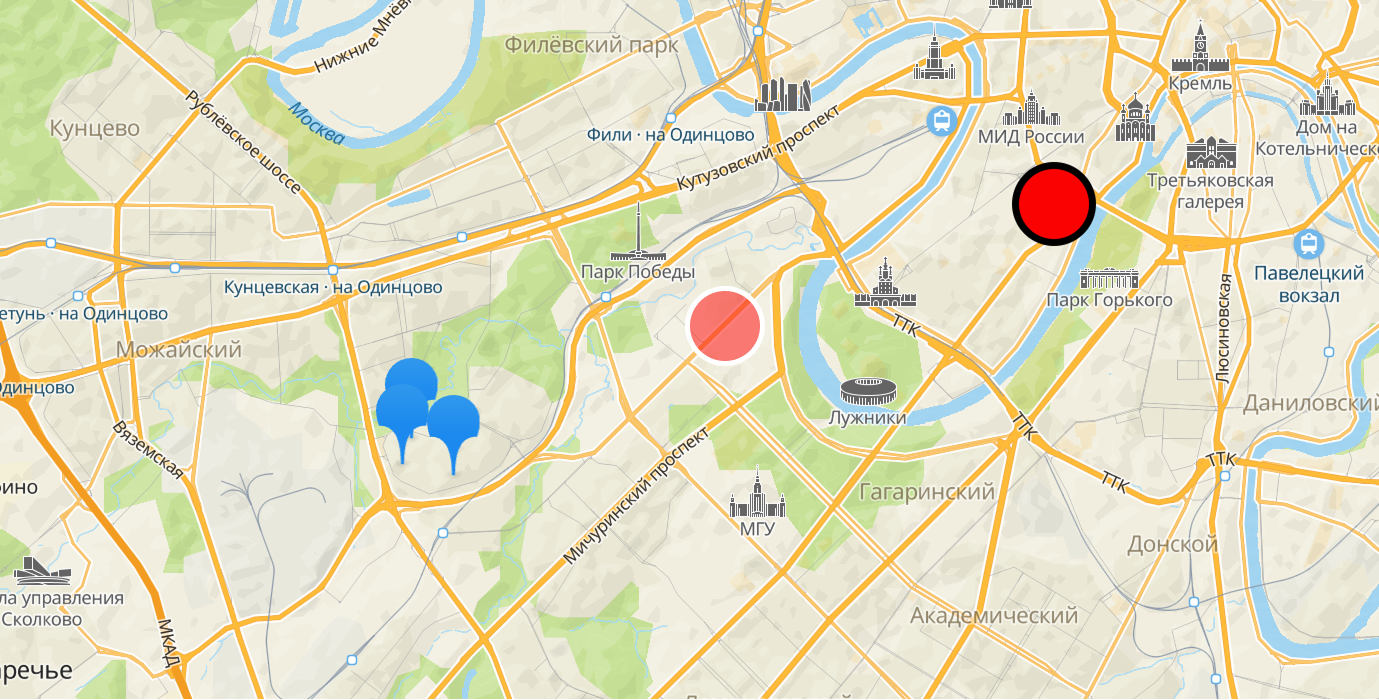
Even if the number of points on route does not change after adding the area to avoid, the route distance and duration may change. Pay attention to the total_duration_s and total_distance_m parameters in the solution metrics.
For example, a route distance and duration from the task example with no area to avoid:
{
    "total_duration_s": 3897, // 1 hour
    "total_distance_m": 55501 // 55.5 km
}
And with the area to avoid specified above:
{
    "total_duration_s": 7036, // 2 hours
    "total_distance_m": 77815 // 78 km
}
Excluded points and couriers
If a task cannot be solved with all conditions met, TSP API suggests a route with some points or couriers excluded. Information about excluded components is available in the result field of the response: the dropped_waypoints and dropped_agents arrays.
The solution contains the excluded points and couriers with reasons specified. For example:
{
    "result": {
        "dropped_waypoints": [
            {
                "id": "wp-16",
                "reason": "route_does_not_exist"
            },
            {
                "id": "wp-18",
                "reason": "route_does_not_exist"
            },
            {
                "id": "wp-7",
                "reason": "failed_time"
            }
        ],
        "dropped_agents": [
            {
                "id": "agent-1",
                "reason": "empty_agent"
            }
        ]
    }
}
Reasons for excluding a component:
route_does_not_exist- points no routes were built to.failed_time- points that do not fit to couriers work time.failed_time_window_for_worktime- points with time windows no courier can fit.empty_agent- couriers without points, except for the starting and ending ones.