Preparation for installation
Before you install any On-Premise product, you need to:
- Get an On-Premise license.
- Prepare network infrastructure.
- Add Helm repository.
- Fetch installation artifacts.
1. Get an On-Premise license
To access the repository containing installation artifacts, you need an On-Premise license (see Keys and tokens).
- Fill in the form at urbi.ae.
- Having received the license key, specify it in DGCLI configuration file.
2. Prepare network infrastructure
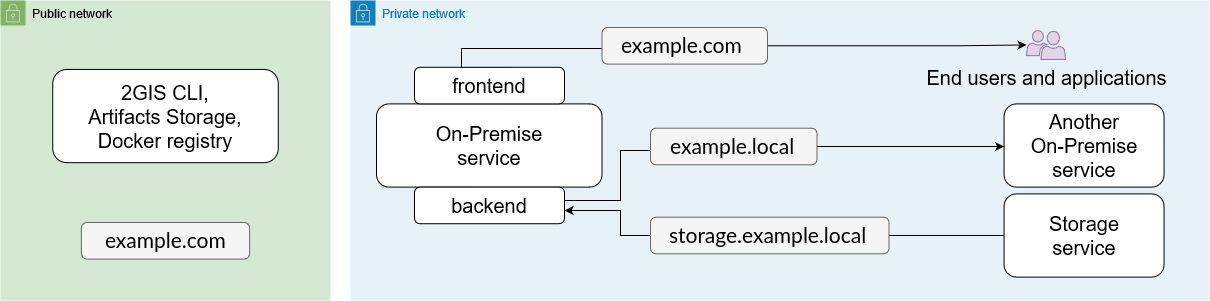
The recommended infrastructure for running On-Premise services includes a public network and a private network. The table below describes an example of such an infrastructure with the example.com and example.local domains. All the components must be deployed in a single Kubernetes cluster managed from the example.com host.
| Infrastructure component | Who must have access | Network type | Domains used in the documentation |
|---|---|---|---|
| Artifacts delivery infrastructure | The infrastructure administrator | Public | example.com example-external.comexample-internal.com |
| Docker Registry for storing service images | DGCLI utility from the example.com host | Public | docker.registry.example.com |
| Installation Artifacts Storage | DGCLI utility from the example.com host | Public | artifacts.example.com |
| Services' frontends | Applications and end users in the private network | Private | *.example.com |
| Services' backends | Other services and storages from all pods in the Kubernetes cluster | Private | *.example.local |
| Data storages | Other services and storages from all pods in the Kubernetes cluster | Private | *.storage.example.local |
If you use Managed Kubernetes (Kubernetes as a Service) to deploy the product, make sure that access to the Docker registry is configured using the HTTPS protocol and a certificate signed by a trusted certification authority (for example, Let’s Encrypt).
3. Add Helm repository
A Helm chart from the On-Premise repository is used to install each product. You need to add this repository on the host from which the installation will be run. In the example described above, it is the example.com host.
-
Install the Helm package manager into the cluster. To do so, follow the official installation instructions.
-
Add the repository containing the Helm charts.
helm repo add 2gis-on-premise https://2gis.github.io/on-premise-helm-charts
helm repo update -
Check that Helm and the repository are installed correctly by running:
helm search repo 2gis-on-premiseIf the command output contains a non-empty list of charts, everything is set up correctly.
4. Fetch installation artifacts
4.1. Configure hosts
Example of On-Premise hosts architecture:

docker.registry.example.com
This host will serve the Docker Registry. The host must be available in the public network, see Preparation for installaion.
To configure the host:
-
Install an operating system.
-
Install Docker Registry.
The registry must be available at
https://docker.registry.example.com/.The Kubernetes cluster must trust this registry and be able to download images from it. To do this, the registry must be configured with a valid HTTPS certificate.
-
Configure authentication in the registry by username and password.
Example:
- Username:
registry - Password:
DOCKERregistryP@ssW0rd
- Username:
artifacts.example.com
This host will serve the S3 compatible installation artifacts storage. The host must be available in the public network, see Preparation for installation.
To configure the host:
-
Install an operating system.
-
Install an S3 compatible storage that fits your needs. It is recommended to use Ceph.
The storage must be available at
https://artifacts.example.com/. -
In the installed storage, create the
onpremise-artifactsbucket of the needed size. -
Set a service account with read and write permissions to the bucket.
Generate a key for this account, which will be be used to access the bucket.
Example:
- Access key:
AKIAIOSFODNN7EXAMPLE - Secret key:
wJalrXUtnFEMIK7MDENGbPxRfiCYEXAMPLEKEY
- Access key:
example.com
This host will serve the DGCLI utility. The host must be available in the public network, see Preparation for installation.
To configure the host:
-
Install an operating system.
-
Install Docker Engine.
-
Ensure that the previously configured services are available:
https://docker.registry.example.com/https://artifacts.example.com/
After that, you can download the installation artifacts using one host.
If a single host cannot provide simultaneous access to the public network, Docker registry, and S3 compatible storage, configure two hosts:
example-external.comwith access to the public network;example-internal.comwith access tohttps://docker.registry.example.com/andhttps://artifacts.example.com/.
After that, you can download the installation artifacts using two hosts.
4.2. Download installation artifacts
The process can be launched on one host that has both Docker registry, S3, and internet access, or on two separate hosts with different access settings. Perform the following steps depending on the selected host configuration.
For downloading installation artifacts, DGCLI utility is used. Before running the utility, ensure your user has permission to run Docker without using sudo. Otherwise, download errors will occur.
- Using one host
- Using two hosts with different access options
-
Log in to
example.comvia SSH. -
Create the
dgctl-config.yamlconfiguration file. In thecomponentssection, specify the versions of all components included in your build. For a detailed description of the available parameters, see the DGCLI configuration file description.dgctl-config.yamlkey: DEMO-KEY-DGCTL-AAAAAA-BBBBBB
log-format: json
storage:
type: s3
host: artifacts.example.com
bucket: onpremise-artifacts
access-key: AKIAIOSFODNN7EXAMPLE
secret-key: wJalrXUtnFEMIK7MDENGbPxRfiCYEXAMPLEKEY
docker:
registry:
username: registry
password: DOCKERregistryP@ssW0rd
server-address: https://docker.registry.example.com
image-prefix: /
# For utility version 3
components:
core:
version: <core-version>
api-platform:
version: <api-platform-version> -
Download installation artifacts to the file system using the DGCLI utility:
docker run --rm \
   -v $(pwd)/dgctl-config.yaml:/dgctl-config.yaml \
   -v /var/run/docker.sock:/var/run/docker.sock \
   -v $(pwd)/values:/values \
   --user $(id -u):$(id -g) \
   2gis/dgctl:3 \
   pull --config=/dgctl-config.yaml --apps-to-registry --generate-values
Fetching artifacts may take a long time. When the process is complete, the command output will include the path to the manifest files for all components. Example:
manifests/<component>/1640661259.json.If you use the
--generate-valuesflag, thegeneral.yamlfile with configuration parameters is generated and stored in the local directory specified in the-v <path>:/values/<component>/argument (-v $(pwd)/values:/valuesin the example). If the path is not specified, the file is deleted after running the utility.Using DGCLI version 2If you are using DGCLI utility version 2, additionally specify the
--versionparameter with the required On-Premise software suite version. For details, see DGCLI command-line arguments reference.
When using two hosts, you need to download installation artifacts from the update servers and transfer them to an S3 compatible storage. You can use the DGCLI utility (recommended) or another S3 client for this purpose.
-
Connect to the
example-external.comhost via SSH. -
Create a directory to fetch the installation artifacts. You can save its path in the
COPY_DIRenvironment variable. For example:COPY_DIR=/mnt/dgctl-source -
Create a
dgctl-config.yamlconfiguration file. In thecomponentssection, specify the versions of all components in your build. For a detailed description of the available parameters, see the DGCLI configuration file description.dgctl-config.yamlkey: DEMO-KEY-DGCTL-AAAAAA-BBBBBB
log-format: json
storage:
type: fs
directory: /data
# For utility version 3
components:
core:
version: <core-version>
api-platform:
version: <api-platform-version> -
Download installation artifacts to the file system using the DGCLI utility:
docker run --rm \
   -v $(pwd)/dgctl-config.yaml:/dgctl-config.yaml \
   -v $COPY_DIR:/data \
   -v $(pwd)/values:/values \
   --user $(id -u):$(id -g) \
   2gis/dgctl:3 \
   pull --config=/dgctl-config.yaml --generate-values
Fetching artifacts may take a long time. Once the process is complete, the command output will include the path to the manifest files for all components. Example:
manifests/<component>/1640661259.json.If you use the
--generate-valuesflag, thegeneral.yamlfiles with configuration parameters are generated for each component and stored in the local directory specified in the-v <path>:/values/<component>/argument (-v $(pwd)/values:/valuesin the example). If the path is not specified, the files are deleted after running the utility.Using DGCLI version 2If you are using DGCLI utility version 2, additionally specify the
--versionparameter with the required On-Premise software suite version. For details, see DGCLI command-line arguments reference. -
Transfer the
COPY_DIRdirectory from fromexample-external.comtoexample-internal.com. -
Connect to the
example-internal.comhost via SSH. -
Create a
dgctl-config.yamlconfiguration file. In thecomponentssection, specify the versions of all components in your build. For a detailed description of the available parameters, see the DGCLI configuration file description.dgctl-config.yamlkey: DEMO-KEY-DGCTL-AAAAAA-BBBBBB
log-format: json
storage:
type: s3
host: artifacts.example.com
bucket: onpremise-artifacts
access-key: AKIAIOSFODNN7EXAMPLE
secret-key: wJalrXUtnFEMIK7MDENGbPxRfiCYEXAMPLEKEY
docker:
registry:
username: registry-user
password: DOCKERregistryP@ssW0rd
server-address: https://docker.registry.example.com
image-prefix: /
# For utility version 3
components:
core:
version: <core-version>
api-platform:
version: <api-platform-version> -
Transfer the data from the
COPY_DIRdirectory to the Docker registry and storage using the DGCLI utility:docker run --rm \
-v $(pwd)/dgctl-config.yaml:/dgctl-config.yaml \
-v $COPY_DIR:/dgctl-source \
-v /var/run/docker.sock:/var/run/docker.sock \
--user $(id -u):$(id -g) \
2gis/dgctl:3 \
restore --config=/dgctl-config.yaml --from-dir=/dgctl-source --apps-to-registry
4.3. Create a Kubernetes secret for accessing Docker Registry
This secret is required so that Helm, which is used for installing On-Premise services, can access the Docker images located in the Registry. Without a secret, any operation involving the Registry will fail.
Example:
kubectl create secret docker-registry onpremise-registry-creds \
    --docker-server=docker.registry.example.com \
    --docker-username=registry \
    --docker-password=DOCKERregistryP@ssW0rd